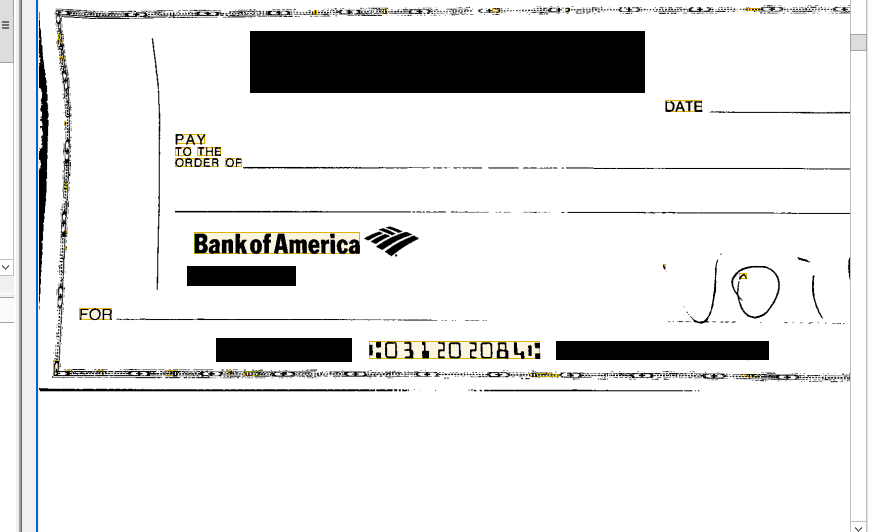
Then numbers on a check has a different font and there for regular pre-recognition can not recognize them as numbers. Is there a way to fix this? Like importing a kind of fonts etc?
Check number font recognition

Was this article helpful?
0 out of 0 found this helpful
Comments
4 comments
The text you are trying to get is printed in MICRE13B font which is not available for pre-recognition in FlexiLayout Studio (if I understood you right, you are working on a flexilayout).
If you are going to extract those data with FlexiCaptyre then I would suggest you to set up the flexilayout so the area with this MICRE13B text is included properly in a text block, and then set corresponding text type in the recognition properties of this block (see attached image) in the document definition.
Hope this helps.
[Update] I realize that if I want to capture these number, in FlexiLayout I need to specify to capture any character, instead of just numbers, in order for FlexiCapture to find them with the right font. Is there no other way then? In the case where area restriction is not dynamically enough to be applied.
[Forum bug] After replying, if I go back and edit it, there is no button to save the changes. Only "Cancel" or "Delete"
It is not enough to set MICRE13B text type in the block properties of the document definition if the block region is not captured properly in the FlexiLayout.
First you need to ensure that the region of MICRE13B is properly restricted, regardless of what element type is used for the resulting block. Element type is only used to assist FlexiLayout Studio to identify this or that image part that will be used for data search in FlexiCapture (in fact FlexiLayout Studio captures and provides to FlexiCapture no "text" data, only blocks' positions and types).
As MICRE13B cannot be pre-recognized (and, thus, cannot be considered StaticText or CharacterString), you can use any element type that will provide you appropriate region for your future block. I would suggest you using ObjectsCollection together with search area restrictions: for example, search it near the page bottom and on the right of FOR static text (or any other text that is pre-recognized on your sample page reliably and can be used as reference).
Unfortunately restricting the region seems to be the only way to extract this type of text.
Please sign in to leave a comment.