
Hi
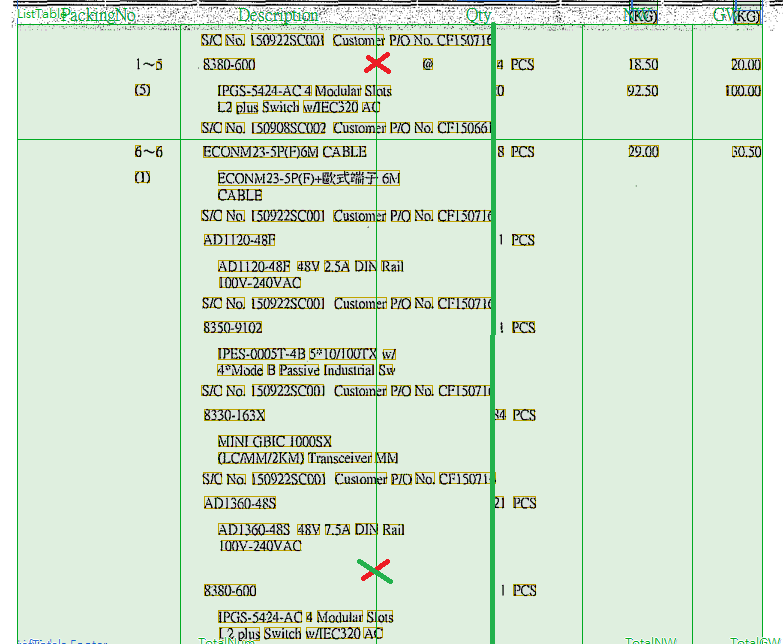
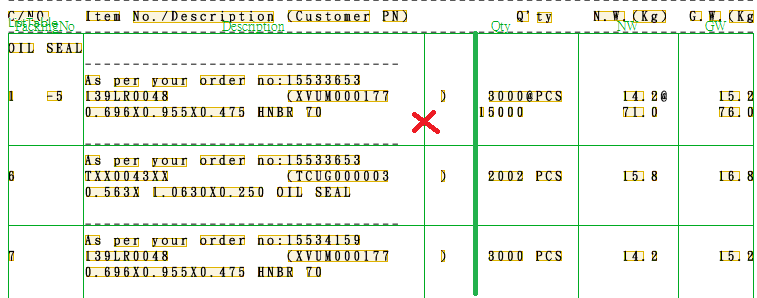
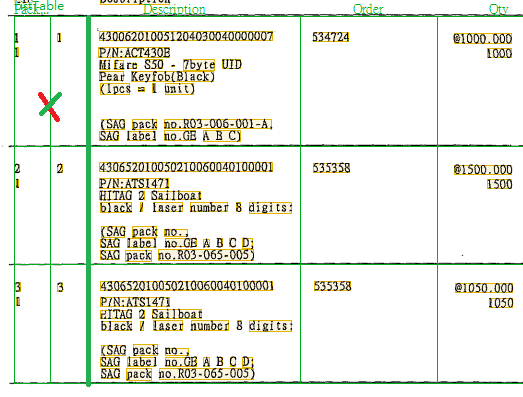
I have encountered about the problem in several documents for a long time. Please see the following screenshots, the line has red cross is the match result and the thick green line is the expected result. How can I do?
By the way, I often use the fixed column order to get the content of tables. I try to set the table properties->column->table block properties->absolute area constraints->left/right boundary, but it will mismatch the table body(orange border in FLS match result). I don't have any idea now.
All the suggestions will appreciate. Thanks for reading my problem.
I have encountered about the problem in several documents for a long time. Please see the following screenshots, the line has red cross is the match result and the thick green line is the expected result. How can I do?
By the way, I often use the fixed column order to get the content of tables. I try to set the table properties->column->table block properties->absolute area constraints->left/right boundary, but it will mismatch the table body(orange border in FLS match result). I don't have any idea now.
All the suggestions will appreciate. Thanks for reading my problem.
Comments
5 comments
it seems that some additional restrictions for column headers are needed in your case.
For example, you could create some group element, then add the keyword for a column and additional reference elements (whitegaps or separators) so this group element covers the region that corresponds to the actual column width. Then you can create a search element of Region type, set it up so it takes the region of your group element, and then in the table properties set this region as a column header.
In fact you can use any surrounding elements, even the ExactColumnBorders method in Advanced pre-search relations, - the main goal is to find the column header region as precise as possible.
The certain implementation depends on the case and unfortunately it is hard to provide you with a solution without seeing the flexible description.
If you would like to get more details, then please share your FLS project so we could check it and suggest you the optimal way to find the table columns.
Thanks for your reply first. It seems a little hard to me to understand the concept now. But I will do my best to try it.
I really want to know how to use ExactColumnBorders method in Advanced pre-search relations. I believe it will help me a lot in after working.
There are my three attachments, it is sorry to occupy you much time. So could you please use one of them as a model which can let me learn from.
Thank you again for everything you’ve done.
Thanks for your first method, I have succeeded in two attachments. I used group with white gap and static text to increase the width.
The last attachment I will try with more element to achieve it. Because it has just one sample can train and too closed boundary. I can't solve it now.
If i understand correctly, it is the Lantech_PackingList FlexiLayout in which you faced some difficulties with specifying column borders.
I have attached a modified FlexiLayout with an example of how ExactColumnBorders method borders can help in table matching.
First thing you will notice is that Description and Qty as well as NW and GW columns were joined.
In advanced presearch relations of ListTable you will find two methods that describe borders for these columns using additional elements.
Notice that one of the elements in your repeatable group was marked as requered element, this is to limit repeatable group instances only to those which contain this element.
Best regards
Tim
Thanks for your help and reply. Your description of sample is clear and simple for me to realize. I know how to use the ExactColumnBorders method now.
Thanks you again for everything you’ve done.
Please sign in to leave a comment.