
Hi
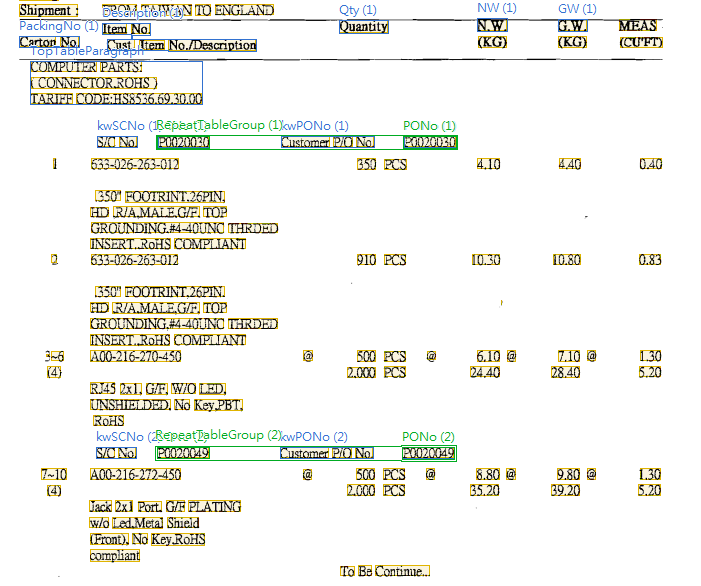
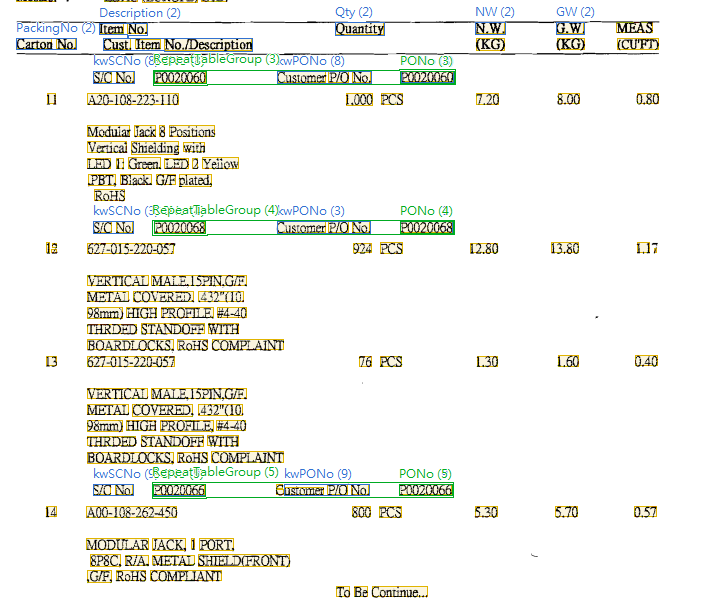
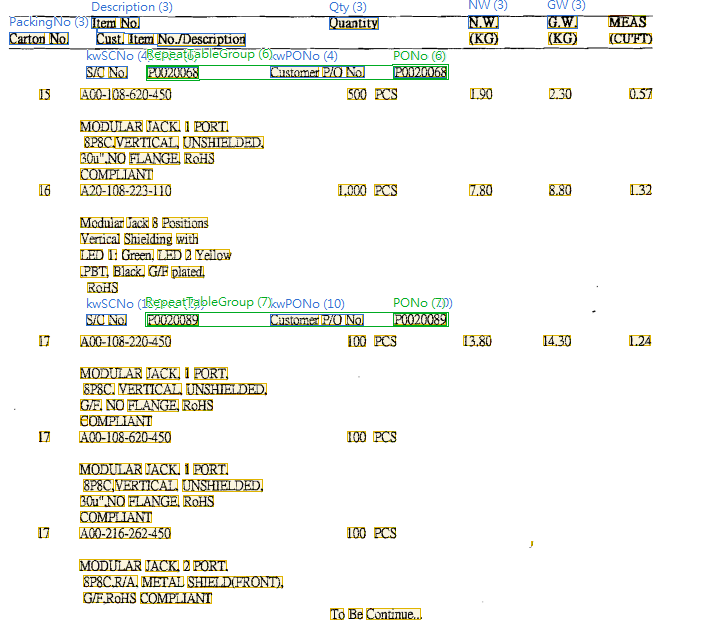
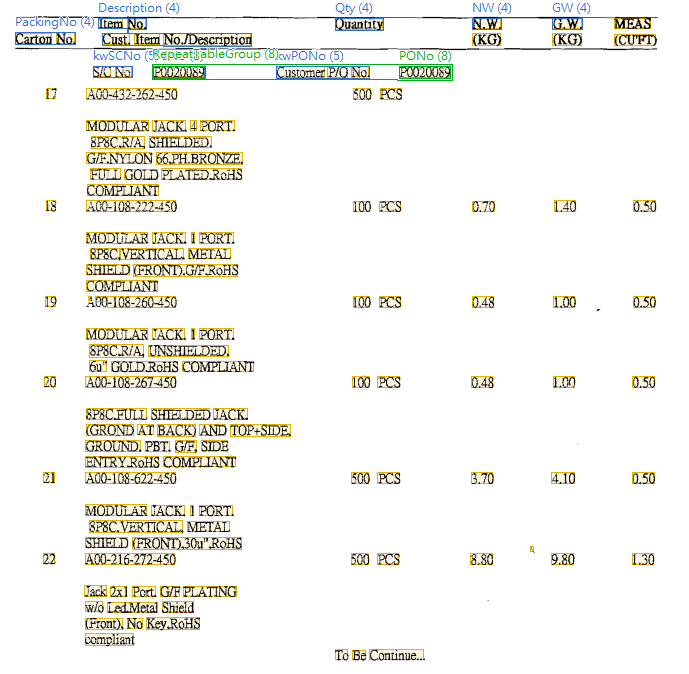
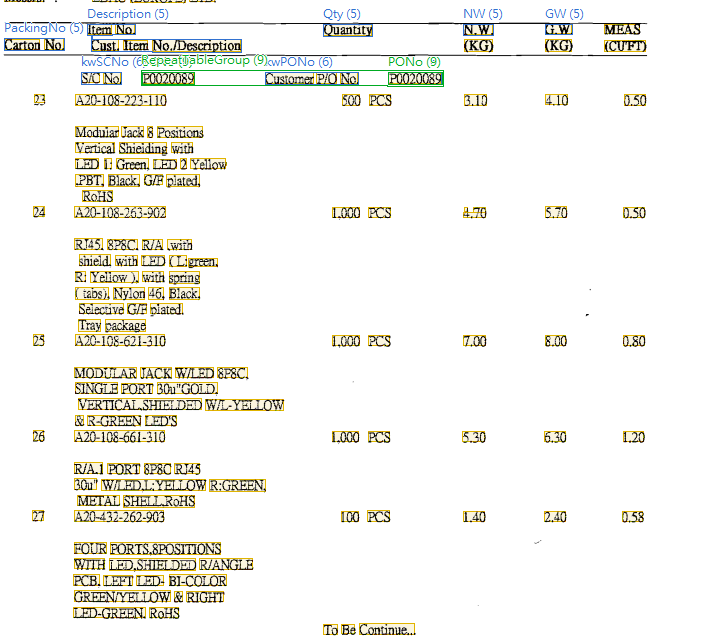
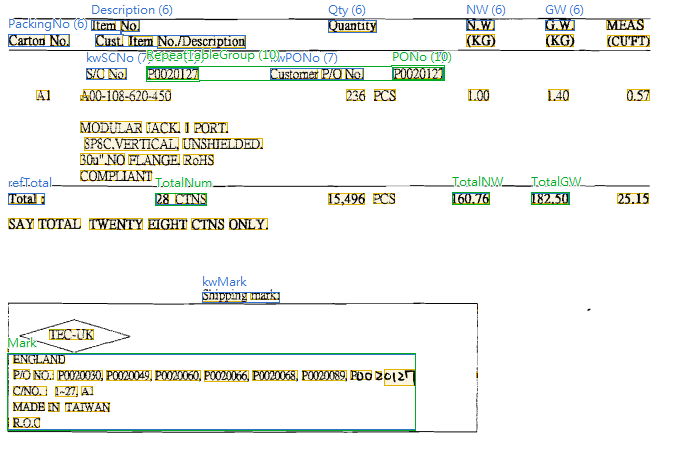
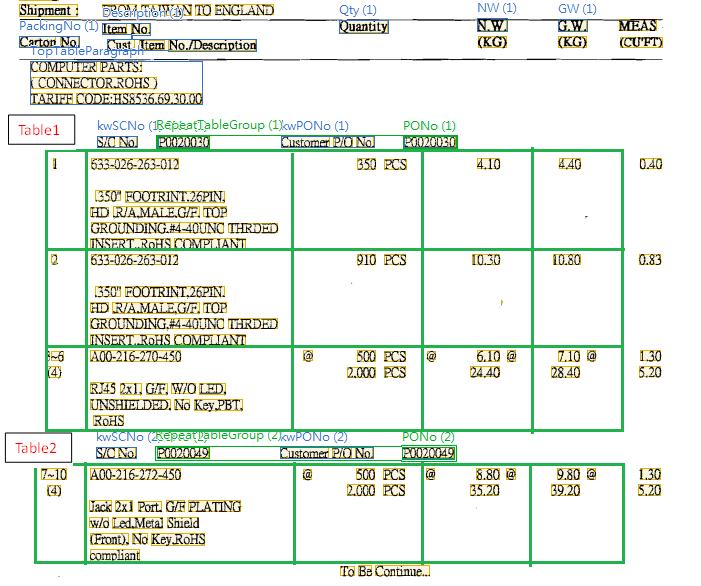
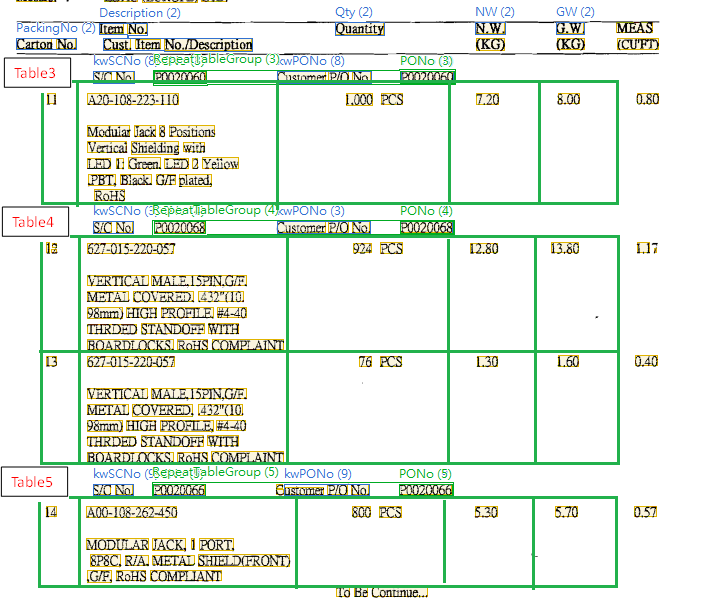
As the no.1~6 enclosed images, the packing list table has static text "S/C No." and "Customer P/O No." which repeat several time. It will have overlap problem when separating columns or rows. It seems not a traditional table to capture.
So, I have a idea as following step:
1. Use Repeating Group->Text block to get strings of "S/C No." and "Customer P/O No."
2. Use Repeating Group->Table which has relations->below to AllInstances of "S/C No." and stop from static key word "S/C No." as footer (Because the option of relation doesn't have next Instance)
3. I can't match to any table, But I only has a orange border below last found instance.
The no.7~8 enclosed images are my expected result. I want to get a table with the same index of RepeatTableGroup individually.
What's wrong with my idea? Or, is there have another method can teach me?
All the suggestions are appreciated, thanks for reading my problem. It is sorry about my poor explanation.
As the no.1~6 enclosed images, the packing list table has static text "S/C No." and "Customer P/O No." which repeat several time. It will have overlap problem when separating columns or rows. It seems not a traditional table to capture.
So, I have a idea as following step:
1. Use Repeating Group->Text block to get strings of "S/C No." and "Customer P/O No."
2. Use Repeating Group->Table which has relations->below to AllInstances of "S/C No." and stop from static key word "S/C No." as footer (Because the option of relation doesn't have next Instance)
3. I can't match to any table, But I only has a orange border below last found instance.
The no.7~8 enclosed images are my expected result. I want to get a table with the same index of RepeatTableGroup individually.
What's wrong with my idea? Or, is there have another method can teach me?
All the suggestions are appreciated, thanks for reading my problem. It is sorry about my poor explanation.
- bc097330-41c1-463a-8c91-a6ba00d79aa7_image-244.png
- 3c34b165-0d83-439a-87c2-a6ba00d79adf_image-247.png
- 48d72e0b-05fa-4886-9e98-a6ba00d79b1d_image-245.png
- cf4dfc82-8ea0-4a94-9b29-a6ba00d79b54_image-246.png
- 8285e537-ad57-4dac-86ee-a6ba00d79b90_image-248.png
- a55dc1dd-90a0-4aed-a9be-a6ba00d79bef_image-243.png
- 64e03d6a-8321-412d-89e3-a6ba00d79c25_image-250.png
- bee2d6ef-dc47-4164-be11-a6ba00d79c60_image-249.png
Comments
9 comments
Such tables require a more trickier approach, one of the ways to match such table comes down to the follwoing steps:
1.Create a repeatable group to capture table headers. Each instance of this repeatable group will represent a separate table.
2.It is true that we cant access any next instances from within a certain repeatable group, so we need to create an additional repeatable group.
Using advanced pre-search relations we can specify borders of each instance by looping through the previous repeatable group using a script that should be similiar to the following:
let DB = FirstRepGroup;
int n = SecondRepGroup.InstancesCount;
if (n + 1 <= db.instancescount)="">=>
{
if (DB.Instance(n + 1)..IsFound) then
{
//search relations
}
else
{
//search relations
}
}
else
{
DontFind;
}
Once we you have a repetable group with correct borders you can add needed header elements to find table columns and the table itself.
If you have any difficulties using this aproach, please provide a sample image, and i will create a sample project.
Sorry, the attachment has the limit of sizes. I use the web HD URL:
https://drive.google.com/file/d/0B822zs4HoW4RamFNX0ZuVW5wQ2s/view?usp=sharing
Thank you again for everything you’ve done. It's sorry to bother again.
In attached FLS project is an example of how two repeatable groups can be used to locate separate repeatable regions.
First repeatable group contains a keyword to locate top borders of all tables
Second repeatable group is created based on instances of first repetable group. Check the advanced pre-search relations in second repeatable group to see how scripts can be used to set relations between the two repeatable groups.
Now that you have correct borders in each instance you can add needed elements inside second repeatable group to find column borders and the table.
Thanks for your help, I will do my best to study your FLS project. I rejoice to have your enthusiastic support.
With my bad knowledge, I failed to get the whole table finally...I try many ideas with my best,but I can't have a good result.
I encountered the problems as follow
1. The index of repeat group is not according to the order.For example, instances was found in (1)->(2)->(7)->(8)->(9)->(3)->(4)->(5)->(6)
2. Between current page and next page, the table will include wrong regions.
In order to have repeating group instances in correct order you need to add specific relations to elements inside, for example you can use the following approach:
1.Find the most reliable element for creationg dependencies
2.this element should have the follwing relations to itself:below last found instance, and near to last found instance
other elements should be somewhere around this element and should not intercept with search areas of instances below.
Another thing that i noticed in your project is that there were some problems with row matching. Consider using "RowSplitters" method in advanced presearch relations to find rows in non-traditional tables. This method uses an yArray to map table rows, y Array can be created with the help of a repeatable group.
I have modified your project so it matches tables correctly, check the diffrences and lookup any methods you are unfamiliar with in help file. Table element has many methods that are usefull in diffrent cases.
Because I'm a beginning user and just start at Nov. There are several documents which has special format and irregular table.
According to your info, I learn more new methods to deal with the advanced research relations to find rows in non-traditional table.
I'm using many methods in advanced pre-search relations even scripts now.
I also try to use the structure about external element of repeating group.internal element of repeating group and nest of repeating group to solve new problems.
But, I get only the content of last page usually when I try to use relation of AllInstances to get all content in Muti-pages document.
Especially, I met a error with using RowSplitters method
{
let yArray = SearchElements.ListTableHeader.AllInstances.SeparatorRepeatingGroup.AllInstances.GetYArray(1); //I want to use separator to split rows in muti-page table
RowSplitters( yArray , isBodyBottomIncluded = false);
}
I will get infinite loop of warning as enclosed image and a double internal error.
The last but not least, I will use this solution in similar table problem. Thanks you again.
To deal with such situations, try testing elements by consequentially turning them on to find the cause of errors or incorrect behavior.
It looks like there are two repeating groups, and you are trying to get an Y array from all instances of two repeatable group:
let yArray = SearchElements.ListTableHeader.AllInstances.SeparatorRepeatingGroup.AllInstances.GetYArray(1)
Refering to a specific instance of base repeatable group is probably a more correct approach:
SearchElements.ListTableHeader.CurrentInstance.SeparatorRepeatingGroup.AllInstances.GetYArray(1)
or
SearchElements.ListTableHeader.Instances(i).SeparatorRepeatingGroup.AllInstances.GetYArray(1)
Thanks for your analysis, maybe I should put the table into first repeat group and use "SearchElements.ListTableHeader.CurrentInstance.Sep aratorRepeatingGroup.AllInstances.GetYArray(1)" instead of putting under root of Searchelements.
Please sign in to leave a comment.