
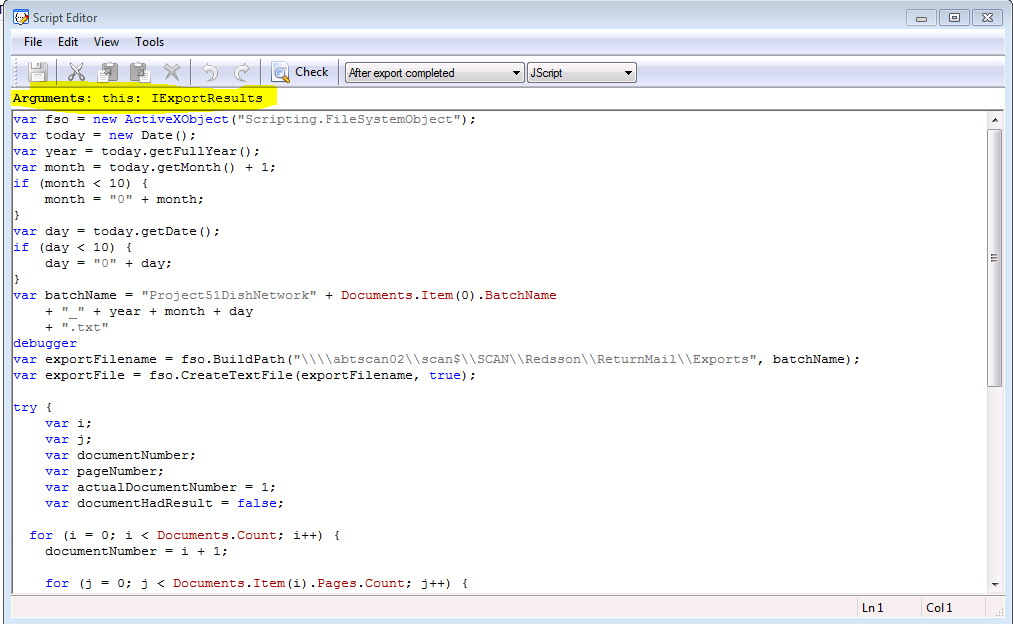
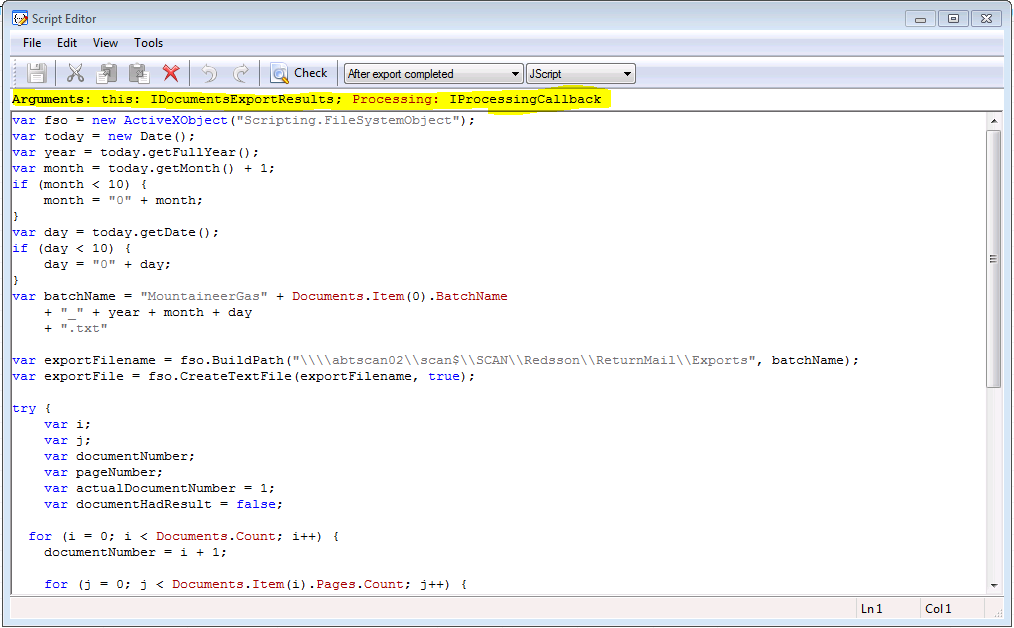
I have several (at least 10) projects that I have previously set up in ABBYY (FlexiCapture 10) that use the “After export complete” event handler to export complete batches of documents. In all of my previous projects, I highlight the “After export complete” event handler and click on the “Edit script” button. I then choose Jscript as my scripting language. When I do this it spells out the arguments in the top of the Script Editor window. In all of my previous projects the arguments bar says the following—“Arguments: this: IExportResults”. I can then use the “Documents” object to get the values I want to export (such as “Documents.Item(0).BatchName”, “Documents.Count”, “Documents.Item(i).Action.Result” etc). For some reason in the new project I am creating when I click on the “Edit script” button after highlighting the “After export complete” event handler I’m getting arguments of “Arguments: this: IDocumentsExportResults; Processing: IProcessingCallback” and it will not initialize the “Documents” object. Whenever I get to a line in the script that tries to utilize the “Documents” object I get an error that says “ ‘Documents’ is undefined”.
After finding nothing in the FlexiCapture documentation I did some googling and was lead to believe that it may be because I did not have the option “Process whole batches” selected on the “Workflow” tab of the Batch Type or Project Properties options, but I do have that option selected. In fact, this project is nearly a carbon copy of my previous projects (which still work just fine, by the way) with all project and batch type options matching my previous projects.
I have attached screen shots and my “After export complete” event handler script detailing what I am seeing. All projects are in FlexiCapture 10.
Just to reiterate, all of my previously created projects still work fine. I just can’t get this new one to act the same.
Thanks much,
Tim Jerhoff
National Business Systems
After finding nothing in the FlexiCapture documentation I did some googling and was lead to believe that it may be because I did not have the option “Process whole batches” selected on the “Workflow” tab of the Batch Type or Project Properties options, but I do have that option selected. In fact, this project is nearly a carbon copy of my previous projects (which still work just fine, by the way) with all project and batch type options matching my previous projects.
I have attached screen shots and my “After export complete” event handler script detailing what I am seeing. All projects are in FlexiCapture 10.
Just to reiterate, all of my previously created projects still work fine. I just can’t get this new one to act the same.
Thanks much,
Tim Jerhoff
National Business Systems
Comments
1 comment
According to the latest version of FlexiCapture 10 build 10.0.6.1589, "after exoprt complete" contains the follwoing arguments:Arguments: this: IDocumentsExportResults; Processing: IProcessingCallback”.
Perhaps in previous versions arguments were as described in first screenshot.
Can you please check versions of FlexiCapture where the projects work correctly
As a work around, try adjusting scripts to use the IDocumentsExportResults object:
this.Item(i).Document.Field("...")
Please sign in to leave a comment.