
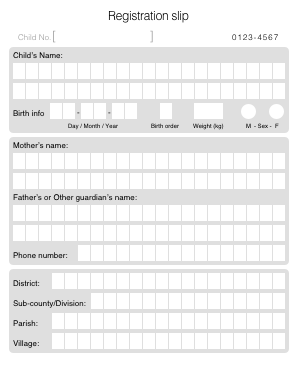
We have grayscale form for recognition (see in attachment).
We have very light background which is removed on stage of preprocessing when image from grayscale transferred to black&white.
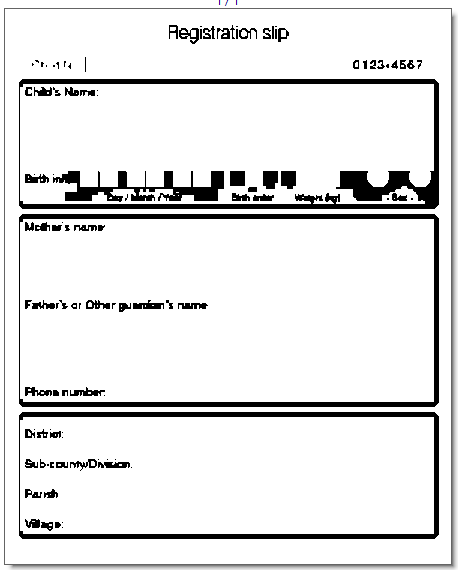
Everything is ok. But, this very light background on different printers could be printed in a different way, and if it is darker than some threshold it become black on black&white (see picture 2) and in this case recognition have a bad quality.
We know that if print in colour, this colour can be dropped out on scanning stage, but we want to keep printing costs as cheap as possible.
So, question is Can we somehow setup a threshold which tell, that colours lighter that threshold are white and which are darker are black?
If we would have this possibility we will avoid fluctuation of background colour.
We have very light background which is removed on stage of preprocessing when image from grayscale transferred to black&white.
Everything is ok. But, this very light background on different printers could be printed in a different way, and if it is darker than some threshold it become black on black&white (see picture 2) and in this case recognition have a bad quality.
We know that if print in colour, this colour can be dropped out on scanning stage, but we want to keep printing costs as cheap as possible.
So, question is Can we somehow setup a threshold which tell, that colours lighter that threshold are white and which are darker are black?
If we would have this possibility we will avoid fluctuation of background colour.
Comments
1 comment
Unfortunatelly such settings are not supported in FlexiCapture.
In order top drop drop gray color correctly try using scaner options.
regards
Tim
Please sign in to leave a comment.