
How can I increase the time a session is killed I tried this solution from the KB https://knowledgebase.abbyy.com/article/1738 but with no success.
The issue we are having is that if the session is inactive for a while we then click refresh and we loose all info in the verification station so we have to reconnect to the server to get it back.
Is there another setting we need to modify to increase the time it takes for the session to be killed?
The best scenario for us would be to have this session active for the duration of the work day so more or less 8 hours.
Thanks
Comments
6 comments
Hello,
Could you please describe in more details what changes you have already made and how much time does the session last now?
I tried putting 2 minutes to the session timeout to test but it seemed that it didn't mater what I put in the InactiveSessionTimeoutMinutes it was not reacting to anything so is that the setting I should be changing or is it on something else. I also tried the registry change and did nothing.
Hello,
Could you send us the screensort, which illustrate how you have added the InactiveSessionTimeoutMinutes parameter? Note that you need to restart services after changing parameters for the changes to take effect.
yes I have restarted the service and nothing changed.
Hello,
Please send us the screenshots, which illustrate how you have added the InactiveSessionTimeoutMinutes parameter (both in IIS settings and in the registry)
Hello,
We are sorry for inaccuracy in our knowledge base. In fact, “DBCleanupJopPeriod” should be a parameter inside the “FlexiBR” subkey in the register. Please see the attached screenshot. Also, the modifications of Verification node which we see at your second screenshot are not needed. Please note that you need to restart IIS and FC11 Processing Server/Station services for the changes to take place.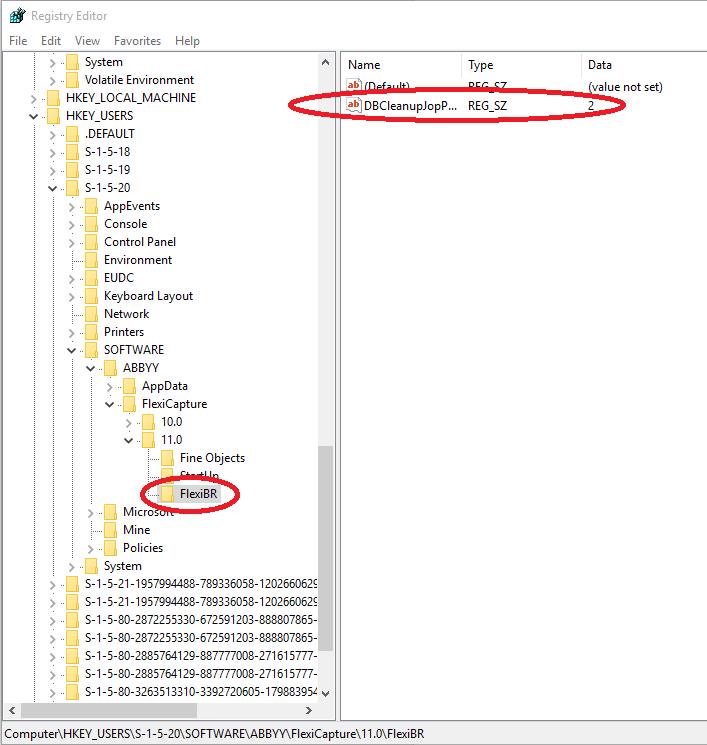
Please sign in to leave a comment.