
Hi,
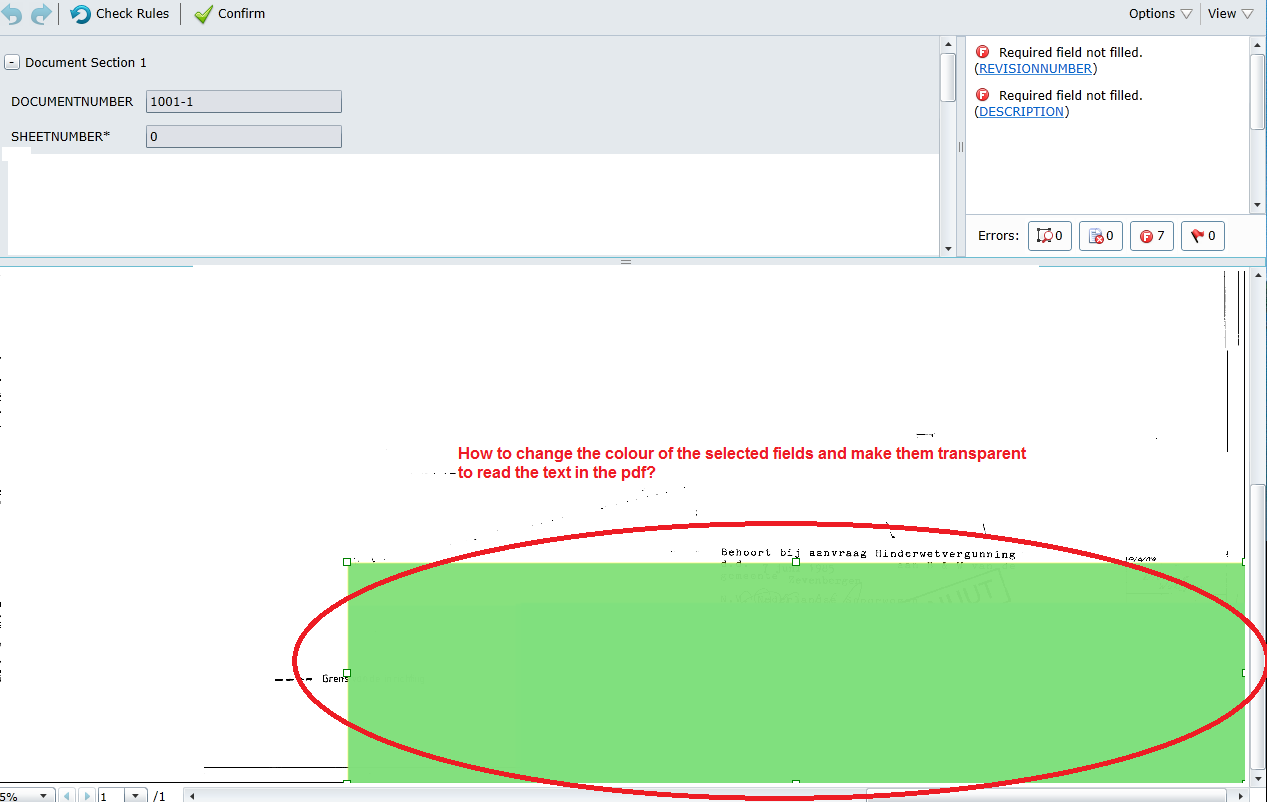
In the Webverification station the selected field is shown in blue colour but the text on the image is not seen.Is there any possibility to make it transparent to read the text (In FC11 version)?Please suggest it would be of great help.
I am attaching the screenshot for reference.
Thanks a lot in advance.
In the Webverification station the selected field is shown in blue colour but the text on the image is not seen.Is there any possibility to make it transparent to read the text (In FC11 version)?Please suggest it would be of great help.
I am attaching the screenshot for reference.
Thanks a lot in advance.
Comments
3 comments
Sadly, there are currently no options to modify color scheme in Web station and almost any other complex modifications as well.
Regards,
Vladislav
Sadly I was unable to replicate your problem. Surely Field regions shouldn't be opaque and they aren't by default.
Web verification station help is available from station itself: triangle in top-right of the page->Help->Appendix->Software requirements and preliminary settings.
Please make sure your soft and hardware requirements fit and if they do please consider trying a different web browser.
Hope that helps,
Vladislav
Please sign in to leave a comment.