
Hi Everyone,
I'm trying to set a field on a document to the content of a registration parameter by calling a document processing script on a script workflow stage.
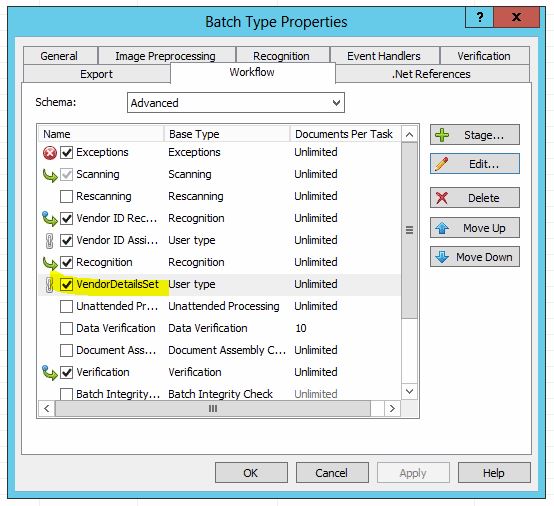
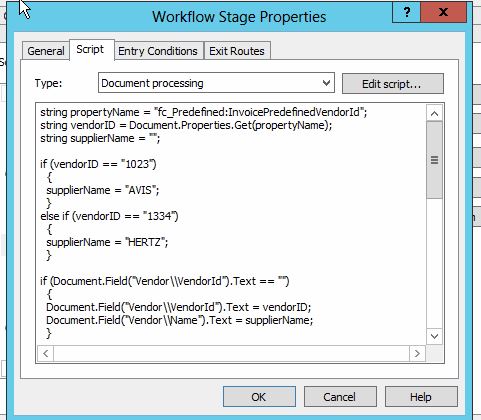
My workflow looks like as per Capture1 and Capture2 attached.
My code is as such
I'm testing the code in this section:
just to see whether I can unconditionally write something back into a field on the document. Nothing is written.
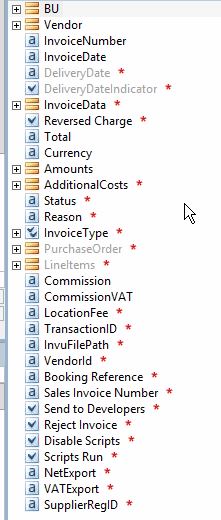
I suspect the paths to my fields might be at fault. See Capture3 attached for an overview of the document structure.
Should I be able to work in this way and if so what am I missing?
Many thanks
Richard
I'm trying to set a field on a document to the content of a registration parameter by calling a document processing script on a script workflow stage.
My workflow looks like as per Capture1 and Capture2 attached.
My code is as such
string propertyName = "fc_Predefined:InvoicePredefinedVendorId";
string vendorID = Document.Properties.Get(propertyName);
string supplierName = "";

if (vendorID == "1023")
  {
  supplierName = "AVIS";
  }
else if (vendorID == "1334")
  {
  supplierName = "HERTZ";
  }

if (Document.Field("Vendor\\VendorId").Text == "")
  {
  Document.Field("Vendor\\VendorId").Text = vendorID;
  Document.Field("Vendor\\Name").Text = supplierName;
  }

vendorID = "";
supplierName = "";
Document.Field("SupplierRegID").Text = "Test";
I'm testing the code in this section:
Document.Field("SupplierRegID").Text = "Test";
just to see whether I can unconditionally write something back into a field on the document. Nothing is written.
I suspect the paths to my fields might be at fault. See Capture3 attached for an overview of the document structure.
Should I be able to work in this way and if so what am I missing?
Many thanks
Richard
Comments
2 comments
What you are trying to do is generally done via script rules and not workflow.
But before that please make sure your field Alias fit references that are made in code and Read-only checkmarks are set up accordingly.
Hope that helps, Vladislav
Please sign in to leave a comment.