
Hi all,
I want to create a group and its' counts are equal to LineItem's counts. The idea is I want to use those fields to get the value in DB and user can verify directly.(I know FC has database check but it seems can't display directly in UI.)
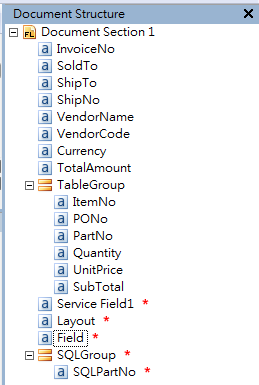
Due to we only can create the fields with a known number, but we can't create the fields dynamically. So, I create a group with a field to test and want to use rule script to solve it(as attachment photo1).
Here is my test code as following, but it will got a error message.(as attachment photo2).
/////////////////////////////////////////////////
IFields table = Context.Field("TableGroup").Items;
int count = table.Count;
for (int i = 1 ; i <= count="" ;="">=>
{
Context.Field("SQLGroup").Items.AddNew(1);------------------------------------------------->test code1
Context.Field("SQLGroup").Items[i-1].Field("SQLPartNo").Items.AddNew(1);--------------->test code2
}
/////////////////////////////////////////////////
I searched "AddNew" in the help file and it said:
"Inserts a new instance of a recurring field. The insertAt parameter specifies the position of the new instance in collection. The method allows you to create strings for a table block without region.Cannot be used in script rules."
Any suggestions is appreciated. Thanks in advance.
I want to create a group and its' counts are equal to LineItem's counts. The idea is I want to use those fields to get the value in DB and user can verify directly.(I know FC has database check but it seems can't display directly in UI.)
Due to we only can create the fields with a known number, but we can't create the fields dynamically. So, I create a group with a field to test and want to use rule script to solve it(as attachment photo1).
Here is my test code as following, but it will got a error message.(as attachment photo2).
/////////////////////////////////////////////////
IFields table = Context.Field("TableGroup").Items;
int count = table.Count;
for (int i = 1 ; i <= count="" ;="">=>
{
Context.Field("SQLGroup").Items.AddNew(1);------------------------------------------------->test code1
Context.Field("SQLGroup").Items[i-1].Field("SQLPartNo").Items.AddNew(1);--------------->test code2
}
/////////////////////////////////////////////////
I searched "AddNew" in the help file and it said:
"Inserts a new instance of a recurring field. The insertAt parameter specifies the position of the new instance in collection. The method allows you to create strings for a table block without region.Cannot be used in script rules."
Any suggestions is appreciated. Thanks in advance.

Comments
3 comments
That method you are trying to invoke isn't available from script rules as you've stated yourself.
However it can be used on processing stages and custom buttons on verification screen for example.
The error your are getting is: you are trying to point to an object that doesn't exist. In script rules you can simply point to Context.Field("SQLPartNo").Items.
Please note that all items of this field will be in one container (e.g. if your field in repeating group has repeating instances they all will be in .Items and not in Items.Items[j]).
Best regards,
Vladislav
Thanks for your responses in advance. It seems that the rule script is a wrong idea.
Are you talking about creating processing stages?(like add a automatic stage and script it before verification) And, what's action about the custom button?
Please let me clarify my problem again.
For example, If a document has 6 items in a repeating Group or has 10 rows in a table(the number is dynamical), I want to automatically create 6 empty fields or empty table of 10 rows on UI.
yes I was talking about adding an automatic stage before verification and scripting it as one of the options. Custom button can be added to Task window (which is only accessible on verification stations after pressing Get task button) and can contain custom actions associated with it pretty much like any other GUI button.
FlexiCapture can use external components like libraries if you want some really complex checks but it still can enter values from SQL database if they are different or fill other values based on one that is being looked up.
Hope that helps,
Vladislav
Please sign in to leave a comment.