
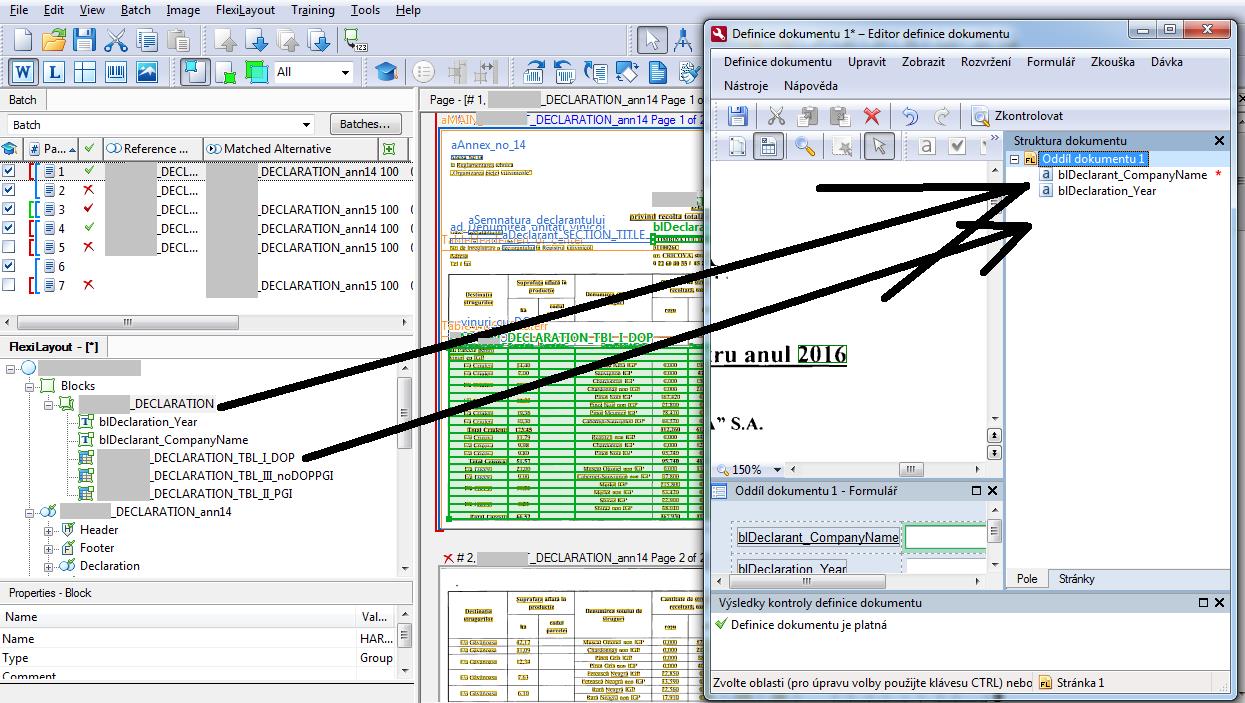
There is one issue documented nowhere in the help I can find - what prerequisites am I missing for a "table" block specified in a "FlexiLayout document block" that it does not appear in the "document structure" in "administration station - document definition" module? (See screenshot)
Thanks in advance
Comments
5 comments
Hello,
On your screenshot we see some discrepancies: in the FLS screenshot all blocks in FlexiLayout window look like they do not have corresponding Search Elements, but in the Image window these blocks look like matched ones.
Please re-check your layouts' and .afl files' versions, re-export the .afl from the most recent FLS project that matches the Table block and update the Document Definition FlexiLayout with this .afl file,
If the proposed actions do not help, please send us your FLS project for further examination if it is possible.
Hello, thanks for answer, however the tables DO have their search elements (I wanted to post you a screenshot here, but Im not allowed to attach any other file in the reply and the WYSIWYG editor here does not allow to insert images from local storages, only those that are online(*), however I cannot send you the FLS as it is, since Im working allready with sensitive non-public governmental data, so the only what I might do is to delete all the images from the project and send it to you (directly on your e-mail, definitely not here in public), if it would help.
*) Ah, after I have posted it, the post has offered me the option of attaching the file, so you may seee the screenshot. Please note, that there are some artifacts of the creative process (such as for example a "FirstFound" group with only one item and so on), Im aware of these, but the cleaning-up of the flexi layout has not yet been done, as Im in the middle of the creation.
Please could you post me here your email so I can send the FLS to you? Thanks
Hello,
Sorry, we do not use the private email in our work. I offer you to upload the project archived with password-protection on any file storage by your choice, and then send me the link and the password by private message on this forum.
Otherwise you may contact your regional support and get private channel for transferring your project.
Hi, I'm sorry, when I was preparing the FLS file for you, I have found the reason. Definitely my mistake :-( There are two directories (one conteined into another) both having the same name and I was still importing some old compiled "afl" file, instead of the new ones :-( Now it works of course...
This issue can be closed.Thanks for help so far.
Please sign in to leave a comment.