
I'm trying to find the confidence percentage of each recognized character for a particular field ('MemberName'). So in the document definition editor, I created a new text field called 'ConfidenceValue' and wrote the below script. Then under 'Verification' tab of 'MemberName' properties, I set 'Highlight characters if confidence level is less than 80%'. When I ran a test 2 characters got highlighted in Red but the confidence value for them shows 89 and 94 respectively. How is this possible..?
string ConfidenceLevel = string.Empty;
for (int i=0; i<Context.Field("MemberName").Symbols.Count; i++)
{
ConfidenceLevel = ConfidenceLevel + Context.Field("MemberName").Symbols[i].Symbol + "-" + Context.Field("MemberName").Symbols[i].Confidence + "-" + Context.Field("MemberName").Symbols[i].IsSuspicious + "\n";
}
Context.Field("ConfidenceLevel").Value = ConfidenceLevel;
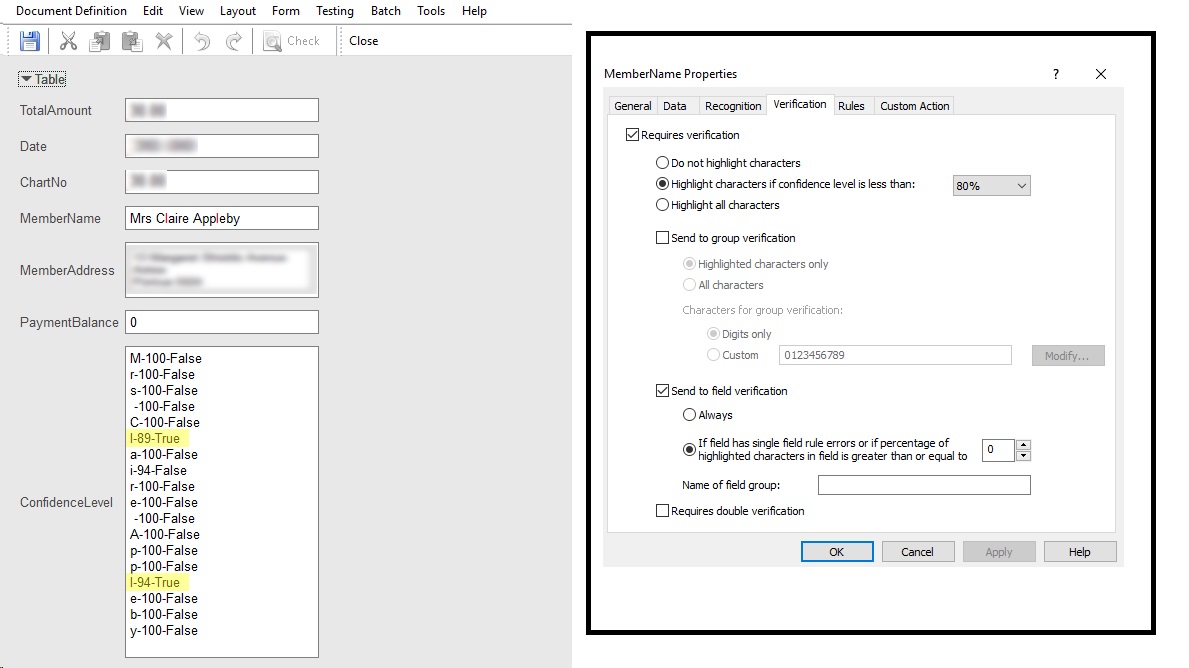
Comments
1 comment
Hello,
Thank you for your feedback. Please send your project and sample images to the regional support. We will be glad to study your case deeper.
Please sign in to leave a comment.