
Hi all,
I have a field which is a repeating group and would like to alert user if any one of them is blank.
So I apply the code in C# like this.
Code Start:
using System;
int TotalCount=Context.Field("Reference").Items.Count;
for (int i=0;i<TotalCount;i++)
{
string tmpResult = Context.Field("Reference").Items[i].Text;
if(tmpResult==""){
Context.CheckSucceeded = false;
Context.ErrorMessage = "Transaction Reference is blank!";
}
}
Code End
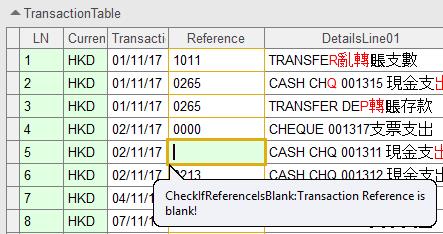
The code will eventually warn user but highlight the entire table.
How can I adjust the code so it ONLY highlight the blank field?
It will looks more user-friendly and make sense.
Thanks in advance.
Comments
2 comments
Instead of coding you can use Cannot be blank option in field properties. Refer attached screenshot
I tried "Cannot be blank" option.It works.
But sorry for missing one important message, I need to pop up a yellow box as error but not red, so coding is needed.
I am really sorry for the miss...
Please sign in to leave a comment.