
Hello!
Can anyone advise on how to make FlexiCapture import corrupted files without creating subfolders for each file?
This is desirable for corrupted files, as we need to monitor that folder to notify users about bad image files that couldn't be handled by FlexiCapture.
Now format of file path is like "root folder\HF_ID348\filename.pdf"
To-be is like: "root folder filename.pdf|
Thanks in advance!
P.S. I have tried workflow scripts, but that doesn't seem to work right. My assumption is that after scanning stage processing stop in case of broken files. Please, correct me if I am wrong.
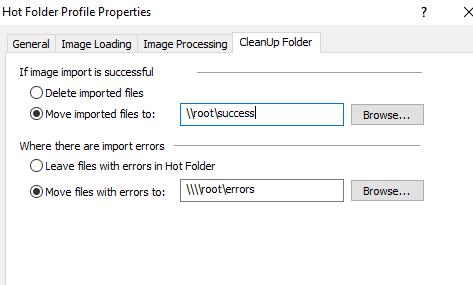
Added screenshot with desired paths to files after import.
Comments
1 comment
Sorry, there is no way to prevent FlexiCapture from creating subfolder structure for moved Exceptions files.
You can use any 3rd party solution that will work with the file system and copy the files from subfolders into the root folder.
Please sign in to leave a comment.