
Hi,
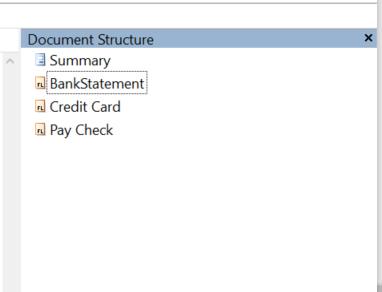
I created 3 flexi layout definitions and uploaded into Administrator station (Standlone). The definitions worked fine while used separately. When I tried to create a document set added all 3 layout, I could not see the fields listed out in the structure. Please refer the attachment
What changes should I make to see the fields in the layouts
Comments
5 comments
Hi,
Why are you using 3 FlexiLayout projects for 3 different fields?
Best regards,
Vladimir
Hi , I think you have misunderstood my question. Let me explain clearly.
I'm trying to work on a sample example similar to Mortgage Form provided by ABBYY
I have 3 documents with different templates. So I created 3 layouts with few fields for each template. I had to group them together in a document set so that I could compare the values from these fields.
When I open the Document definition properties of Document set, I could not create any rule to compare the fields since the fields are not listed in the layout. Please refer the screenshot attached in my earlier post
I'll take a shot at this. Did you create "Blocks" in your FLS projects, and map the elements to the Blocks? Blocks are then tied to the fields in Project Setup Station.
Yes I did create Blocks and mapped the elements. I have attached the screen shots of all the layouts for more details.
Hello,
Please contact your regional support. Provide them your projects, samples images and describe the scenario of your issue.
Please sign in to leave a comment.