Hello All,
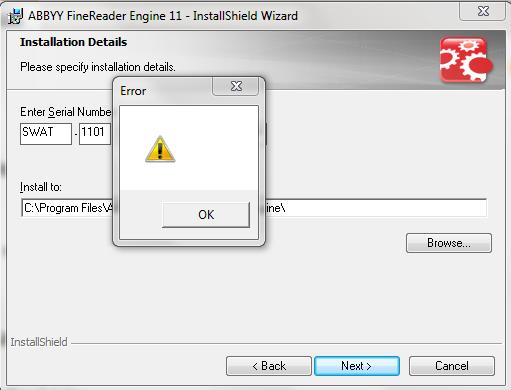
While installing the trial version for FineReader Engine 11, I am getting the ERROR popup box every time, once i submit the licence code and clicking.
Please let me know what is the possible error here?

Hello All,
While installing the trial version for FineReader Engine 11, I am getting the ERROR popup box every time, once i submit the licence code and clicking.
Please let me know what is the possible error here?
0 out of 0 found this helpful
Comments
5 comments
Hi
I suppose your license key is not correct,
All trial licenses I have retrieved over time start with SWET or SWEE, yours starts with SWAT
Best regards
Koen de Leijer
Hi,
Actually, a license number can start with "SWAT".
Possible the downloaded distribution kit is corrupted. Could you please try the following steps?
Delete the downloaded distribution kit from the computer.
Clean out the registry entries left from the previous FREngine 11 installation (if there was such installation earlier):
a. Create a folder on a hard drive (this folder can be located on any drive and have any name, for example C:\EngineUninst).
b. Download the MsiZap utility from the MSDN site.
c. Run the command from the command line:
C:\EngineUninst\MsiZap.exe TW! {AFE11000-0001-0000-0000-074957833700}
Disable the antivirus software installed on your computer.
Download the distribution kit again to the local directory and run the installation by right-clicking onto the setup.exe file and selecting Run as administrator.
In case this does not solve the issue please send to SDK_Support@abbyy.com:
The AInfo report. Please find the instruction of how to create such report in our KnowledgeBase: https://knowledgebase.abbyy.com/article/1208.
The ABBYYMsiLog.txt installation log. It can be found in the %temp% folder. To open the %temp% folder insert %temp% in Windows Explorer address field and press Enter;
The ABBYY FineReader Engine 11.log installation log (generally this log should be included to the AInfo report). This log first appears in the %temp% folder. Then, if the installation was successful, it is moved to the installation folder. If the installation failed it remains in the %temp% folder.
Hello,
I am still getting the error box while installing the Finereader Engine, can some help me from ABBYY as I need to decide the use of this for my project work?
Still it give the error message as "You have entered an invalid serial number"
We have answered you by email.
Please sign in to leave a comment.