how can we read check boxes ()round or square ) using ABBY Fine reader JAVA SDK?
Check Box in ABBY FineReader SDK

Was this article helpful?
0 out of 0 found this helpful
how can we read check boxes ()round or square ) using ABBY Fine reader JAVA SDK?
0 out of 0 found this helpful
Comments
7 comments
Hello Rama!
Please find detailed instructions for checkmarks recognition in Developer's Help - Guided Tour - Advanced Techniques - Recognizing Checkmarks.
Please pay your attention that in order to recognize checkmarks you must have an ABBYY FineReader Engine license that supports the OMR module. The information about modules included in your license is available in the License Manager - License Parameters - Data Capture section.
What is the other alternative I have? I am using fine reader Engine on Linux.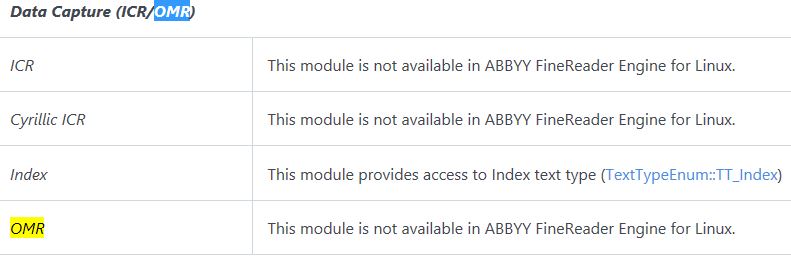
Hello Rama!
You are right, checkmarks recognition is not supported in ABBYY FineReader Engine for Linux. Please find a full list of unsupported features in the Developer's Help → Specifications → Differences between ABBYY FineReader Engine for Windows and Linux.
The possible alternative solution is to use Cloud OCR SDK for working with the checkboxes. Its processCheckmarkField method allows you to extract the value of a checkmark on an image and returns the result of recognition in XML format. The values of checkmarks can be "checked", "unchecked", or "corrected". Please learn more about using this method via the link.
If you are interested in Cloud OCR SDK, our Linux OCR Quick Start Guide will help you to get started with using this service.
Hi Helen,
How can we do this by using cloud ocr SDK? How to include processcheckmark field mothod?
Hi Rama,
Cloud OCR SDK is a service that provides the web API for OCR. To use it, you need to be registered. After registration of your account, you will receive the login and password for the Cloud OCR SDK site and will be able to create Application ID and Application Password for each of your applications. This ID (or the name of your application) and Password are required by ABBYY server for each request.
The processCheckmarkField method sends to the server a request of the following type:
In this request, you should specify the processing parameters such as checkmark type and coordinates of the processing region. Please review the related topic to learn how to specify the processing region. The image file is transmitted in the request body. The result of recognition is returned in XML format. Checkmarks values after the recognition could be "checked", "unchecked", or "corrected".
Our Quick start guides and Code Samples should help you to get started.
Hi Helen Osetrova,
Can we have any sample any code snippet in java to use OMR?
A checkmark field is an element on a machine-readable form (usually rectangular in shape and often called a “check box”) in which a mark should be made (a check/tick, an X, a large dot, inking over, etc.).
the technical term for this is “Optical Mark Recognition” (OMR)
Please sign in to leave a comment.