
Hi,
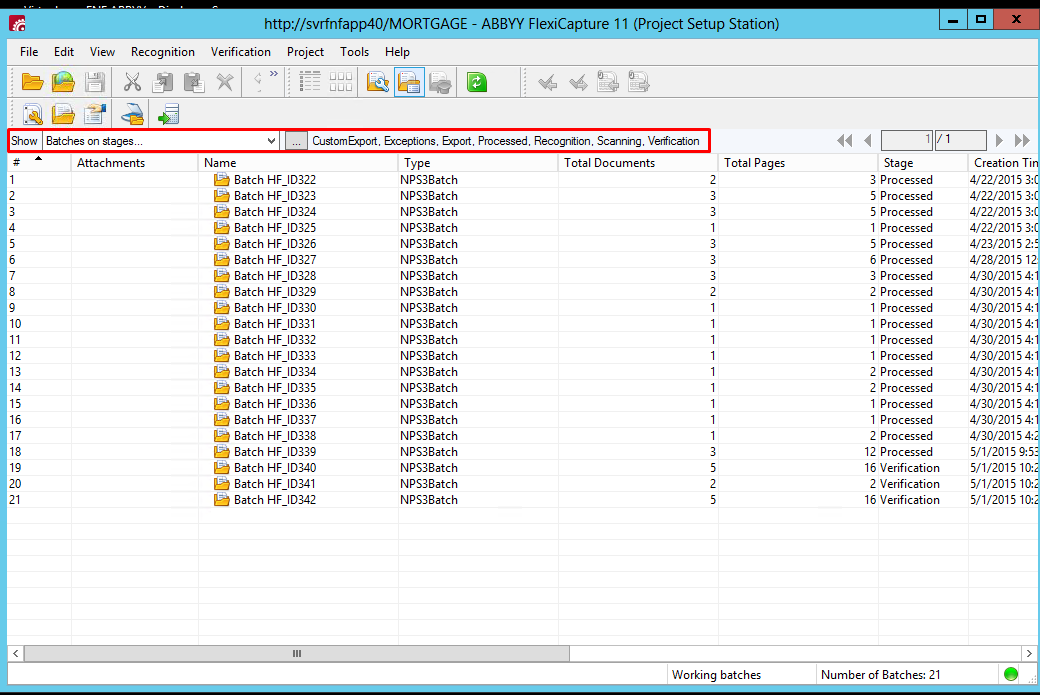
Most of the times I notice that in the project setup station, I can only see few batches even if I select the 'batches in all stages' option.
How do I see all the batches that are processed from the beginning to the latest batch?
Please refer to the attached screenshots.
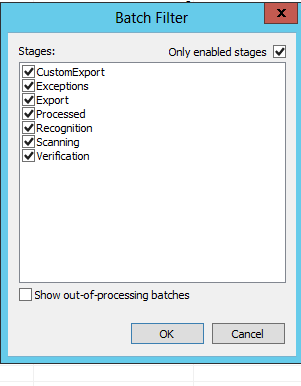
You can see that all the stages are enabled but only batches from Batch HF_ID322 to Batch HF_ID342 are shown.
Is there a way to see all the batches that are processed from the start of the project i.e. from Batch HF_ID1.
Thanks!
Most of the times I notice that in the project setup station, I can only see few batches even if I select the 'batches in all stages' option.
How do I see all the batches that are processed from the beginning to the latest batch?
Please refer to the attached screenshots.
You can see that all the stages are enabled but only batches from Batch HF_ID322 to Batch HF_ID342 are shown.
Is there a way to see all the batches that are processed from the start of the project i.e. from Batch HF_ID1.
Thanks!
コメント
5件のコメント
That actually looks correct. Ar you sure you didnt delete the batch? If you go into the Admin and Monitoring Console, Go the Batches. Does it show more batches there? I think those other batches might have been deleted
It shows the same number of batches (Batch HF_ID322 to Batch HF_ID342) in the Admin and monitoring console too.
I don't remember deleting any batches. Is there any other reason this happens?
Yes. It's the auto delete batches option in the Batchtype settings.
投稿コメントは受け付けていません。