
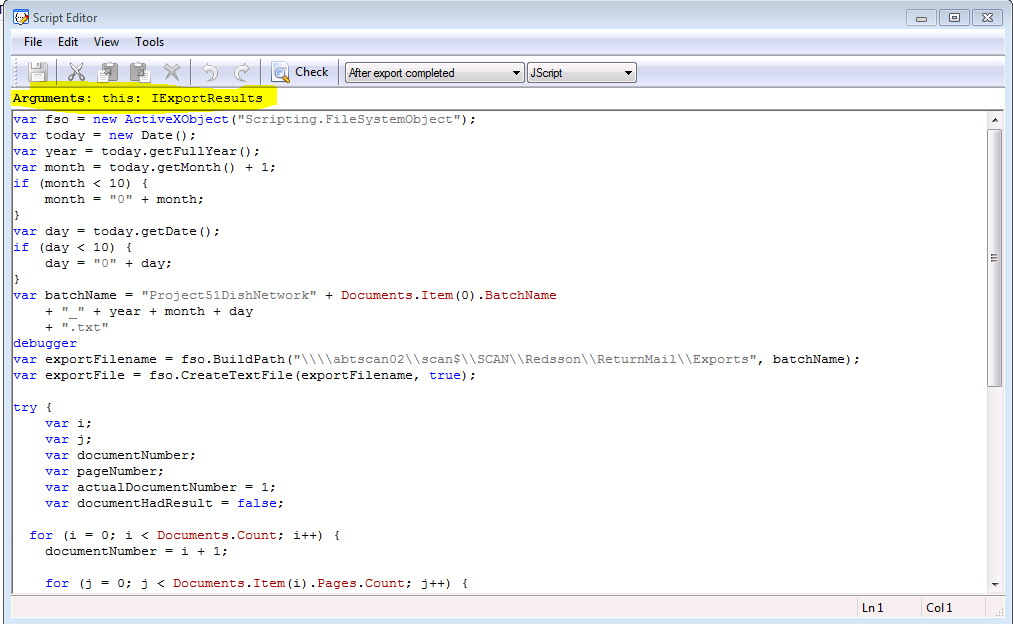
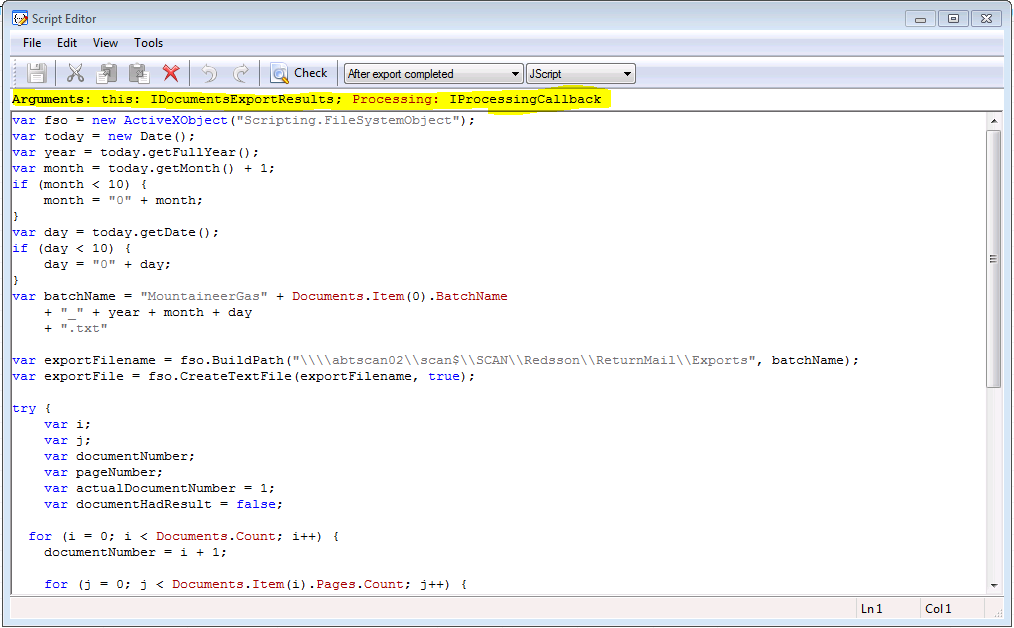
I have several (at least 10) projects that I have previously set up in ABBYY (FlexiCapture 10) that use the “After export complete” event handler to export complete batches of documents. In all of my previous projects, I highlight the “After export complete” event handler and click on the “Edit script” button. I then choose Jscript as my scripting language. When I do this it spells out the arguments in the top of the Script Editor window. In all of my previous projects the arguments bar says the following—“Arguments: this: IExportResults”. I can then use the “Documents” object to get the values I want to export (such as “Documents.Item(0).BatchName”, “Documents.Count”, “Documents.Item(i).Action.Result” etc). For some reason in the new project I am creating when I click on the “Edit script” button after highlighting the “After export complete” event handler I’m getting arguments of “Arguments: this: IDocumentsExportResults; Processing: IProcessingCallback” and it will not initialize the “Documents” object. Whenever I get to a line in the script that tries to utilize the “Documents” object I get an error that says “ ‘Documents’ is undefined”.
After finding nothing in the FlexiCapture documentation I did some googling and was lead to believe that it may be because I did not have the option “Process whole batches” selected on the “Workflow” tab of the Batch Type or Project Properties options, but I do have that option selected. In fact, this project is nearly a carbon copy of my previous projects (which still work just fine, by the way) with all project and batch type options matching my previous projects.
I have attached screen shots and my “After export complete” event handler script detailing what I am seeing. All projects are in FlexiCapture 10.
Just to reiterate, all of my previously created projects still work fine. I just can’t get this new one to act the same.
Thanks much,
Tim Jerhoff
National Business Systems
After finding nothing in the FlexiCapture documentation I did some googling and was lead to believe that it may be because I did not have the option “Process whole batches” selected on the “Workflow” tab of the Batch Type or Project Properties options, but I do have that option selected. In fact, this project is nearly a carbon copy of my previous projects (which still work just fine, by the way) with all project and batch type options matching my previous projects.
I have attached screen shots and my “After export complete” event handler script detailing what I am seeing. All projects are in FlexiCapture 10.
Just to reiterate, all of my previously created projects still work fine. I just can’t get this new one to act the same.
Thanks much,
Tim Jerhoff
National Business Systems
コメント
1件のコメント
According to the latest version of FlexiCapture 10 build 10.0.6.1589, "after exoprt complete" contains the follwoing arguments:Arguments: this: IDocumentsExportResults; Processing: IProcessingCallback”.
Perhaps in previous versions arguments were as described in first screenshot.
Can you please check versions of FlexiCapture where the projects work correctly
As a work around, try adjusting scripts to use the IDocumentsExportResults object:
this.Item(i).Document.Field("...")
サインインしてコメントを残してください。