
Hi,
In DocDef editor, it can create three service fields(create time/recognized time/export time).
In our observation:
create time is the start time of creation.
recognized time is the finish time of recognition.
export time is the start export time of export.
But, we still need the start time of recognition.
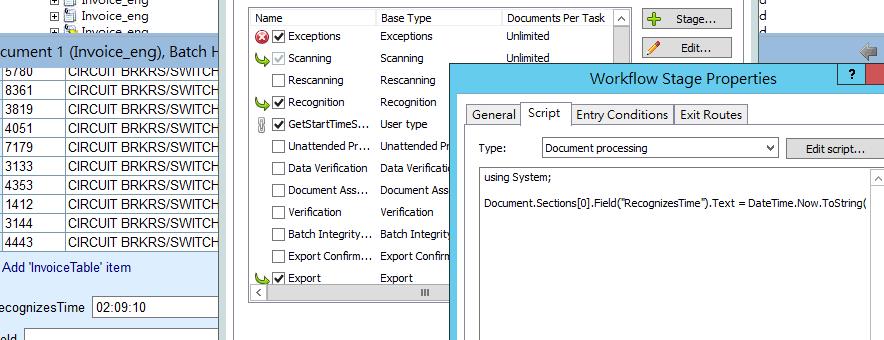
My idea is add a custom stage before recognition stage in advanced workflow.(Please see the attachment image)
And, use a script to get current time on PC and assign this value to field.
I found it will occur a error
Document 1: System.Runtime.InteropServices.COMException (0x80004005): Index out of range. at ABBYY.FlexiCapture.IFields.get_Item(Int32 _index) at Main.Execute(IDocument Document, IProcessingCallback Processing)
I also try to move down this custom stage after recognition stage, it will work correctly.
But, this is not the start time of recognition.
Is there any idea can get the time?
Thanks in advance.
コメント
4件のコメント
Hello,
We were unable to open the attachment, but we suppose that the reported error appears because the document's fields are not available before recognition. In the script stage before recognition you may fill the Document.Comment property by the current time found by .Net methods, and then use this value as an approximation of recognition beginning.
Hi Ekaterina,
Yes, I guess it is field can't access before recognition stage.
Please refer the link to view the attachment.
http://imgur.com/a/YvY1P
It is my implement add this stage after recognition stage.(But, this time is not my need. It is end time of OCR)
What is "fill the Document.Comment property"? I found "Comment" is just a string in Developer.help
How can I do if I still need to get the time information?
Thanks in advance
Hello,
You may use this code in the script stage before recognition :
Document.Comment = DateTime.Now.ToString();
More information about IDocument.Comment property you may see in the article:
Appendix > Using scripts in ABBYY FlexiCapture > Scripts for customizing processing stages > Objects > IDocument
Hi Ekaterina,
I have solved my issue, thanks for your suggestion!
サインインしてコメントを残してください。