
Hello,
I have a project with a batch called "BatchAUTO" assigned to a custom import profile.
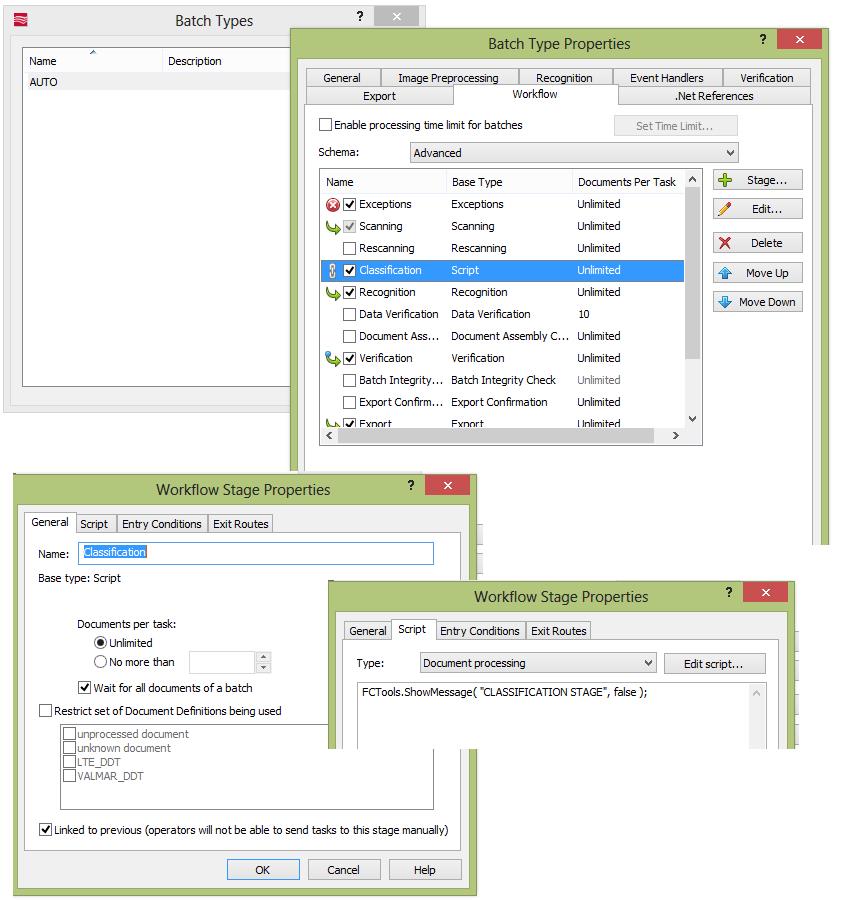
This batch has advanced workflow where I added a custom "Classification" stage, of type Automatic/script, before the Recognition one, with this simple line:
FCTools.ShowMessage( "CLASSIFICATION STAGE", false );
More, I added this simple script for the "before matching event" :
FCTools.ShowMessage( "BEFORE MATCHING EVENT", false );
If I process a document with my batch "BatchAUTO" and I look the task log, I can see the message from the event but not that one from "Classification" stage. Following thew log:
Task processing is started
Document 1: Page 1: BEFORE MATCHING EVENT
Document 1: Page 1: Number of Document Definition sections with FlexiLayouts: 2
Document 1: Page 1: Section 'Document Section 1' (Document Definition 'LTE_DDT') with FlexiLayout 'LTE_DDT'
Document 1: Page 1: Section 'Document Section 1' (Document Definition 'VALMAR_DDT') with FlexiLayout 'VALMAR_DDT'
Document 1: Page 1: FlexiLayouts that can be used for matching (first match will be chosen):
Document 1: Page 1: 'LTE_DDT'
Document 1: Page 1: 'VALMAR_DDT'
Document 1: Page 1: Matching FlexiLayout 'LTE_DDT'...
Document 1: Page 1: Unable to match the FlexiLayout 'LTE_DDT.'
Document 1: Page 1: Matching FlexiLayout 'VALMAR_DDT'...
Document 1: Page 1: The FlexiLayout 'VALMAR_DDT' has been matched with '1' quality.
Document 1: Page 1: Skipped matching the other FlexiLayouts.
Document 1: Page 1: The best Document Definition section is 'Document Section 1' (Document Definition 'VALMAR_DDT').
Document 1: Page 1: Object was processed in 20512 milliseconds.
Task processing is completed
My questions:
Is it possible that the Advanced workflow is not executed ?
How I can check which workflow is used from a task ?
Is it possible that stage "Classification" is not executed ?
コメント
4件のコメント
Hello,
Please check that you have uploaded the project to the Application Server and are working with the uploaded version. Unfortunately , we cannot tell more about your project's behavior without seeing the project. Could you please send it to us, if it is possible?
Hello Ekaterina,
when I uploaded the project on the Application Server, the workflow has been executed.
Summarizing:
- if I import the document inside the project opened in the Project Setup Station, the workflow is not executed
- if I import the document inside the same project running in the Application Server, the workflow is executed
That means I always have to upload the project on the application server before running it and, therefore, I can't use the local project as test environment.
Is it so ?
Hello,
Yes, you are right. Some features can be tested locally on PSS but workflow can be tested only when the project is uploaded on the application server.
Thank You for all.
サインインしてコメントを残してください。