
I have multiple field which belongs to numbers.
I want to make sure no other invalid character is in the field.
One possible solution would be set "AutoReplace" in the field property but i have to set all invalid character in the field and looks not efficeint.
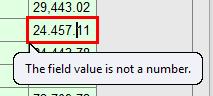
I accidentally found one field fulfil my requirement with an error message as attached.
I cant really spot the difference of that field with my other number field.
Any quick tips for this setting?
Thanks
コメント
5件のコメント
There is two decimal points in the field 24.471.11 because of that reason you are getting this error. You may change that to 24,471.11 then check.
Thanks Abbyy_user0707!
in fact, I intentionally change the 24,471.11 to 24.471.11
Actually I want this error message show on every number field.
But fail to check this field on it's exact setting.
Any idea on how to set a number field not allow input invalid character like !,@,#,$,%..?
Please refer the screenshot and change the setting in respective field. You can create new datatype also, by clicking new option and you can mention the allowed values
Thanks for the screen cap with explanation.I will check it soon.
I saw that you suggest to check the "Process as text" box, what is the function of that box? I check the help document and not quite understand.
Thanks in advance.
Hello,
The program will treat as text type all data types with different content (not only Text content) See the "Value range constraints for text data type" article in the Developer's Help
サインインしてコメントを残してください。