
Hi all,
I got into trouble for Date Formatting.
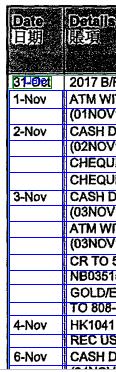
I have a document require to recognize the Date(See attached)
The format is (Date by Digits)-(Mon in Words) on the document but I need to output as DD/MM/YYYY
where YYYY can be get by the other field by script.
I have check the system setting but seems no default setting allow me to recognize the format of "(Date by Digits)-(Mon in Words)"
Thanks in advance.
コメント
7件のコメント
That is, for 1-Nov, i want the output be 01/11/2018.
Hope it is clear.
Hello,
To capture your date you may create the custom data type. See the “Creating custom data types” article in the Developer’s Help
Hi,
But 1-Nov may not necessary be 01/11/2018, it may be 01/11/2017, it depends on other field of my document.
So I believe it have to be done by script instead of ?
I am going to check the Developer's Help now and looking forward to your further advice.
Thanks
Hello
Yes, you may do it by the autocorrection script.
Get the date value from the field, use TryParse function, fixed the format of received value.
You may use the validation option for the check.
Hello,
I had similar issue solved by checking if "TODAY" >= 01/11/2018 then add Year +1.
example parse:
public static string dates(string[] dates)
{
try {
string[] formattedDates = new string[dates.Length];
string[] formats =
{"yyyy.MM.dd","yy.MM.dd","dd/MM/yyyy","dd/MM/yy","d/MM/yy","dd.MM.yyyy", "yyyy-MM-dd","yy-MM-dd" };
for (int i = 0; i < dates.Length; i++)
{
DateTime date;
if (DateTime.TryParseExact(dates[i], formats, CultureInfo.InvariantCulture, DateTimeStyles.None, out date)) formattedDates[i] = date.ToString("dd/MM/yyyy");
};
return formattedDates[0];
}
catch {}
return "";
to make sure your verifcation statiom works properly check the correct format...
//Check if Invoice Date is in the correct format and exit if true
DateTime dDate;
string[] dateformats = { "dd/MM/yy", };
if (DateTime.TryParseExact(DeliveryDateLI[0], dateformats, CultureInfo.InvariantCulture, DateTimeStyles.None, out dDate))
{
return;
}
HI Tson,
thanks for your suggestion with code.
Sad to say our situatino cannot adopt your approach as those setting will definitely go to 2019 and 2020 or more.
Changing the code in the future will be nearly impossible to us.
Your code inspire me as well.
Thanks
サインインしてコメントを残してください。