
The table element doesn't always detect rows correctly. Even when using the "select master column for smart row detection" feature. My question is, is there a way to define as extra row separator in the flexilayout setup? Much like you do in the verification station, where you can add dividers for rows anywhere you wish, but I'd rather do this in the flexilayout itself as a rule, so that the user doesn't have to manually enter the row in every page.
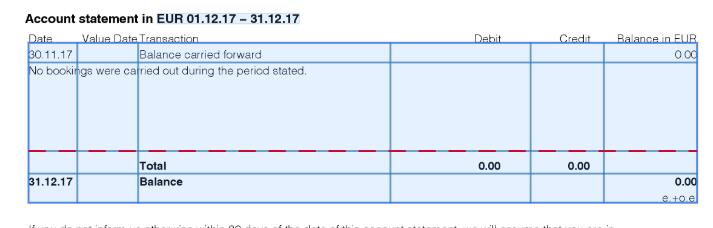
Example (see attached picture): There should always be a row separator above the word "Total". It's a simple rule and I'm sure there's a way to define it in the layout. Any ideas?
コメント
3件のコメント
Hi Akis,
Have you tried Header and footer for the table?
In my case, I use the header-Footer for the table to detect all row between header and footer.
Hi, yes, I'm already using header and footer. Header and footer only helps in defining the start and finish of the table. It doesn't do anything about telling the table where each row should start and end.
My problem is with row detection (as seen in the attached picture), which can't be solved with headers and footers. Looking for a way to create a rule to add a line/separator above the word "Total".
Hello,
Are you using Repeating group Or table Elements to extract the table ?
I think with the RG it will work well !
Regards,
Hamdi
サインインしてコメントを残してください。