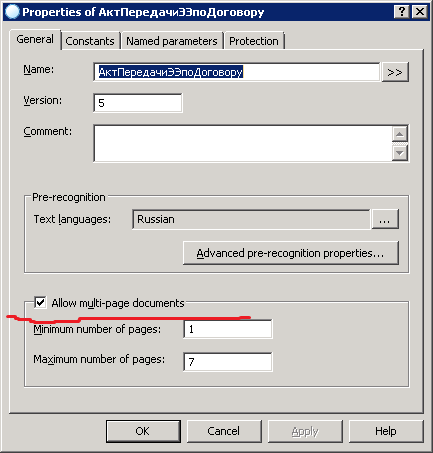
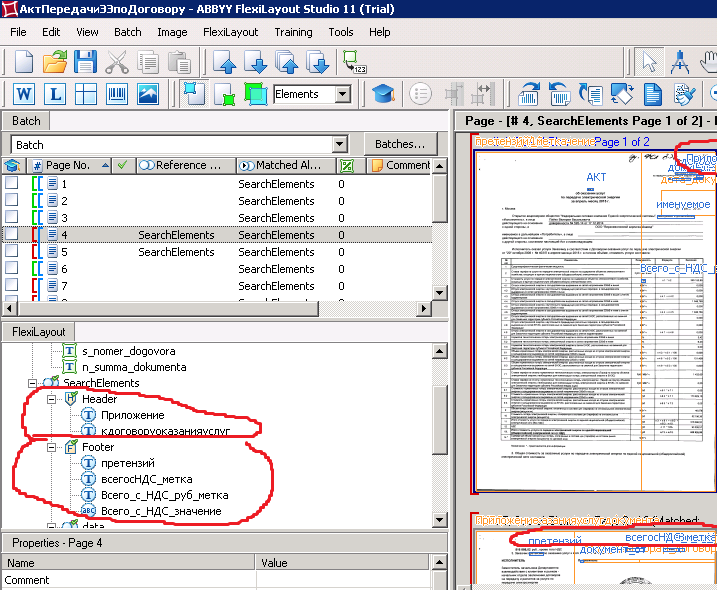
Hello, I can't make any multi-page layout in Flexilayout Studio. I do everything according to help. "Allow multi-page document" is checked. Header and footer are set to "required" and have elements inside. These elements are found during regognition, but still 1 document is 1 page and multi page documents are not assembled.
Why multi-page documents are not assembled?

この記事は役に立ちましたか?
0人中0人がこの記事が役に立ったと言っています
コメント
1件のコメント
For header and footer to properly match on
necessary pages you need to make required elements inside of "Header" and "Footer" groups otherwise layout won't assemble documents as needed and every document will be one-paged since both Header and Footer will be found on every page(no required elements inside their groups). If only one of "Header" or "Footer" elements must be\can be on the page, simply make a "required" region that consists of some rectangle(shape and size are irrelevant, instructions are written in advanced tab of "Region" element) and is made only if at least one optional element from "Header" or "Footer" groups is found on a given page. This way "Header" & "Footer" will have a required element and won't be matched on every page.
Regards,
Vladislav
サインインしてコメントを残してください。