
Hello,
Sorry for newbie question - I'm trying to use script to copy one field from Document section to the each line of the line item's table, but keep getting error:
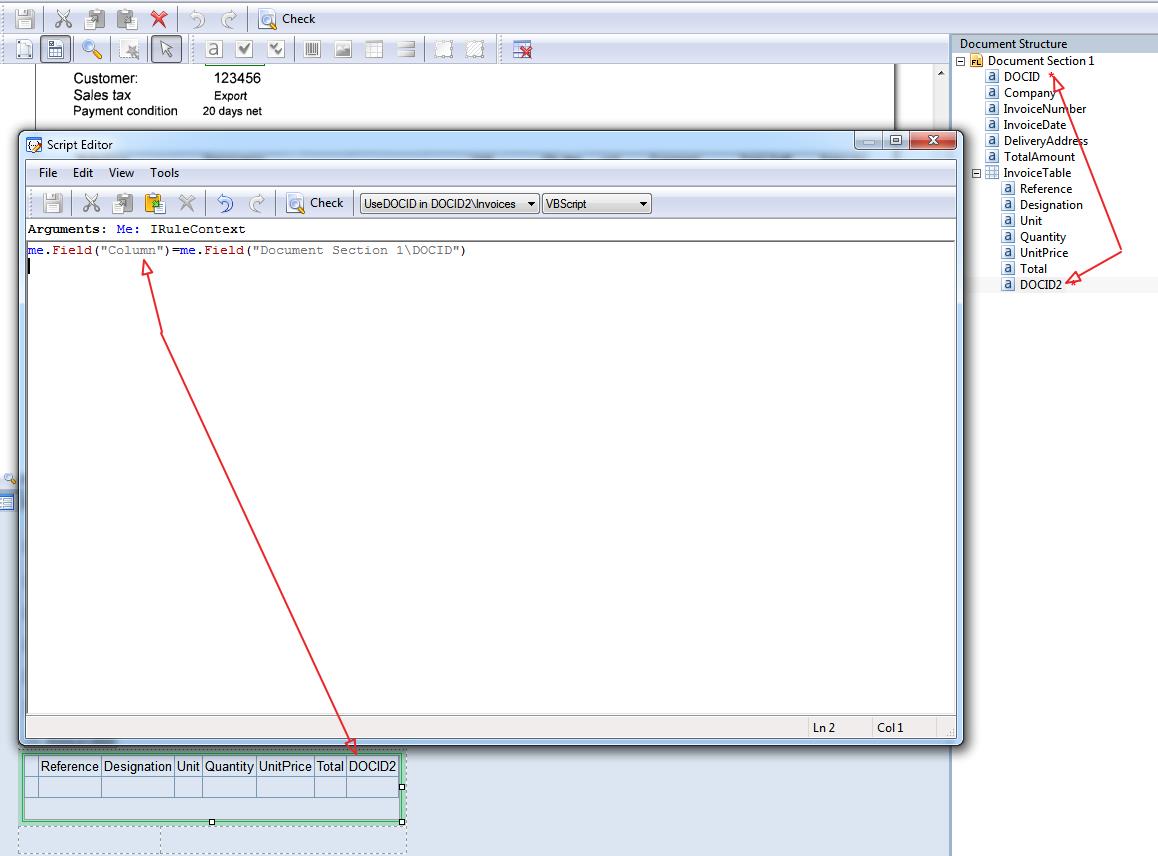
No field with name 'Document Section 1\DOCID' - please see attached image .
Script:
me.Field("Column")=me.Field("Document Section 1\DOCID")
Script is Rule for field DOCID2 executed Always.
What I'm ultimately trying to do - is export line items separately to the Database with DOCID, but for some reason I can't map DOCID field second time (first time it's in Invoice Header) for Line Items
Thank you in advance
コメント
5件のコメント
While I haven't tried exactly what you're trying to do, you might try adding ".value" to the end of your field references...
me.field("DOCID").value = ...
Also make sure you add the fields involved in your formula. Under "rule settings" click the "add" button and then select the desired field (see screenshot). Uncheck the "read only" box if you intend to change the value of that field.
HI
Thank you for reply.
It doesn't work unfortunately.
I think it's because DOCID delongs to the Document Section 1 and DOCID2 to InvoiceTable (which is Table).
Is there the way to get access to other document sections from inside Table ?
Best regards
Hi,
Maybe I'm not clear on what you're trying to do but it works for me as I understand your situation. Put the following code in a script rule in your DOCID2 field:
me.Field("DOCID2").Value = me.Field("DOCID").Value
See attached files. I'm simply pulling the value in DOCID which I'm currently populating with the default word "TEST". After recognizing a document, DOCID2 is indeed showing the word "TEST" in every cell in my results table as shown in the attached screenshot.
Hi
Thank you for your help.
My mistake was not adding DOCID to list of the available fields in the rule. One of your screenshots helped me.
Best regards
Great! Glad to hear it worked for you.
サインインしてコメントを残してください。