
I'm trying to find the confidence percentage of each recognized character for a particular field ('MemberName'). So in the document definition editor, I created a new text field called 'ConfidenceValue' and wrote the below script. Then under 'Verification' tab of 'MemberName' properties, I set 'Highlight characters if confidence level is less than 80%'. When I ran a test 2 characters got highlighted in Red but the confidence value for them shows 89 and 94 respectively. How is this possible..?
string ConfidenceLevel = string.Empty;
for (int i=0; i<Context.Field("MemberName").Symbols.Count; i++)
{
ConfidenceLevel = ConfidenceLevel + Context.Field("MemberName").Symbols[i].Symbol + "-" + Context.Field("MemberName").Symbols[i].Confidence + "-" + Context.Field("MemberName").Symbols[i].IsSuspicious + "\n";
}
Context.Field("ConfidenceLevel").Value = ConfidenceLevel;
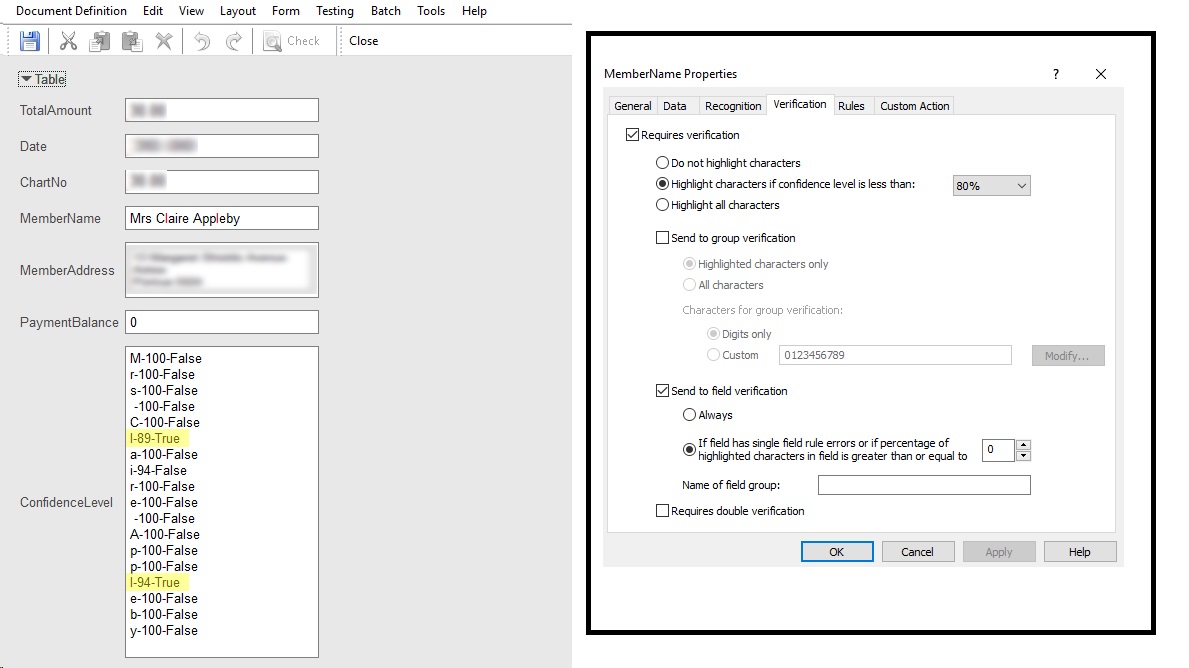
コメント
1件のコメント
Hello,
Thank you for your feedback. Please send your project and sample images to the regional support. We will be glad to study your case deeper.
サインインしてコメントを残してください。