
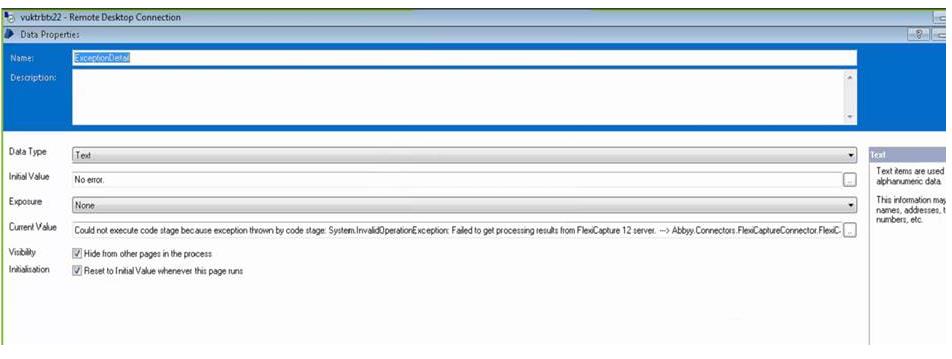
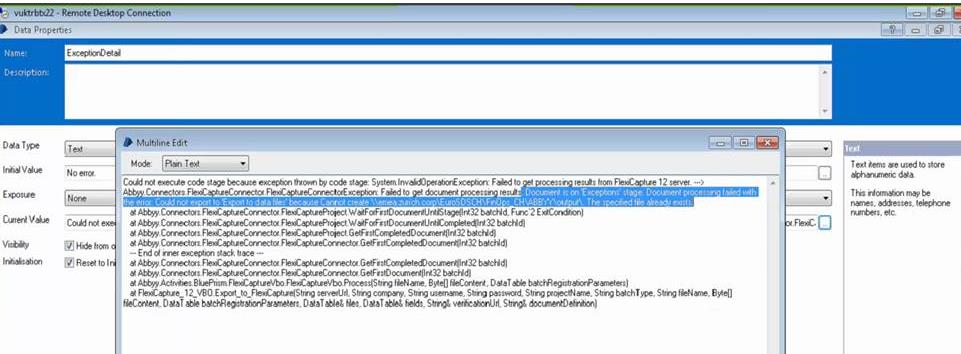
We are trying to connect via the Blue Prism FlexiCapture Connector instructions, and have configured the BluePrism FlexiCapture VBO configurations, as well as the Export settings on the FlexiCapture side. Each application is on a different server and the input/output folders are accessible on both sides. The connection is successful since the documents are being processed, but the issue is that they are not being exported. When exporting ‘manually’ from within the FlexiCapture Project Setup Station it works, but when they files are dropped in Hot Folder on the BluePrism side and the process runs from there, the files are processed but not exported.


コメント
5件のコメント
I assume you have already checked ABBYY server can perform write operations at the export directory.
You can try following setting in project setup station Menu :
Project : Document Definition : Document Definition : Export Settings : Edit
Try to play around Data Export Settings. Specially If File exists , you can ask to suffix or rewrite file.
You can even play around export file name template by adding Time to make sure same file name is not generated again .![]()
BTW which exact version and Type (Multi task/Single Task) of connector you are using ?
Hi Sahota,
Thank you for your feedback. Initially the 'If File Exists' setting was set to 'Add Suffix to name of new file' and was not working. We then changed this to 'Rewrite file' and still getting same error message (have not tried with 'Add to end', suppose would be the same).
We are using the 'Single Task Package' connector
Thank you
Again had a look at error message. It seems to be trying to create file name as dot (.)
Can you share screenshot of export settings , i suggest you to focus on value in Template .
Hi Sahota, please find attached the screenshots
Hello,
If the issue still persists please address it to the regional support
サインインしてコメントを残してください。