
Hi ,
We recently installed ABBYY FlexiCapture 12 and having loads of issues :)
One is the new web verification page -> /VerificationNew (which is now in HTML5)
Since we rollout in FC11, our users are used to the old look and feel on Silverlight.
My question is, can we have a user guide (with screenshots) for the Web Verification Web page?
I managed to find this online -> http://help.abbyy.com/en-us/flexicapture/12/web_verification_station/documenteditor
But I would like a PDF detailing the buttons, labels how everything works.
I have been trying the HTML 5 for a few weeks now, and still having issues wif it.
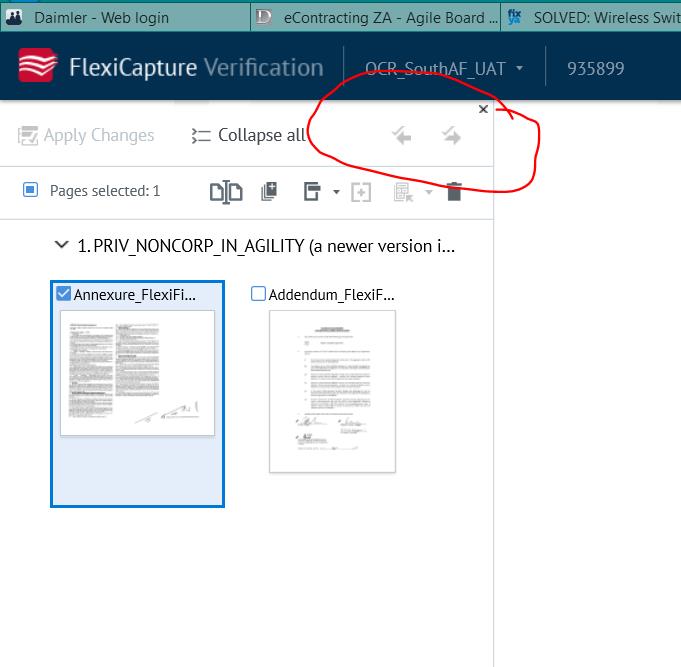
Especially the NEXT ERROR button, which our user is used to using (I will attach a screenshot for clarity)
It doesnt go to the next error now (to the next field with error)
Hope you can help me! Thanks!
コメント
2件のコメント
Hello Melisa,
If you feel that some features don't work as expected on "new" (HTML5) web-station, please document these issues (screenshots, sample projects, scenario) and address them to your regional support.
Meanwhile, there is a possibility to continue using of "old" (Silverlight) web-station. They have "Legacy" in their addresses, like
http://localhost/FlexiCapture12/VerificationLegacy
http://localhost/FlexiCapture12/ScanningLegacy and so on
Are you able to let the users work on those "legacy" stations in your FC12 complex?
Regards
Hi Ekaterina,
Yes I have already notified the support team here in Singapore.
For the legacy web page, yes everything is working fine :)
This is the old address:
http://localhost/FlexiCapture12/Verification
This is the new address wif HTML 5:
http://localhost/FlexiCapture12/VerificationNew
サインインしてコメントを残してください。