
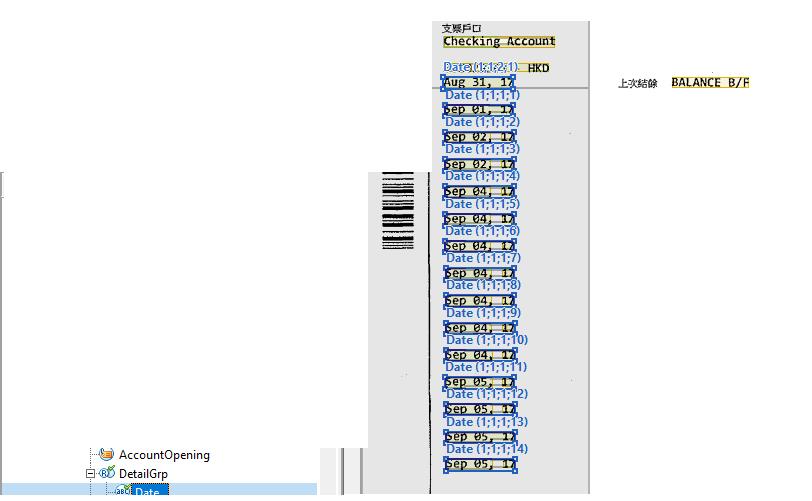
The uploaded file is one of my problem when I developing the layout. (for some privacy reason, i delete some of the screen)
The layout logic is as follow.
1. (optional element) find "BALANCE B/F" as a starting point (on the top right corner in the uploaded image)
2. (optional element) find "END BALANCE" as a ending point (this page dont have), As result, there is a orange rectangle cover the uploaded image.
3. Repeating Group and find all the date below (1) and above (2)
4. the result is showing in the image
But the problem:
The Date(1;1;2;1) is not the data I want.
As my estimation,
1. abbyy capture all the data which are below (1) and above (2), so all date I want are (1;1;1;X)
2. then abbyy capture those reminding date in the orange rectangle (1;1;2;1)
So
1) is my estimation correct or not?
2) how can I solve the problem in effective way? ( I have found the date left of the starting point, and put the element in Date exclude regions (in Date -> properties -> search constraints) to avoid the problem. But it is not effective I think.)
コメント
3件のコメント
Hello,
To prevent capture regions above an optional element you may use the following code:
if HasInstances then Below: LastFound;
If you want to get more detailed answer you should create and send us the mock up image and mock up project.
Is it possible to make the orange rectangle disappear but still using optional element?
Hello,
We saw nested repeating group on your screenshot. To get you more accurate advice we need to investigate your project.
サインインしてコメントを残してください。