
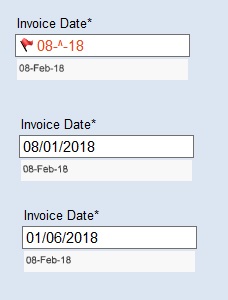
Hi, we are having issues with ABBYY Flexicapture for Invoices 11 (Version 11.0.6.2822) in that dates that are either being completely incorrectly interpreted or gibberish displays in the field. However, when using "click on image," the data appears correctly. What setting do we need to adjust?
I've attached a screnshot of 3 date examples where ABBYY captures the incorrect information or gibberish.
コメント
3件のコメント
Hi,
Go to your date field, open Data tab, in Data type section click on Edit and make sure that "May include month in words" is checked.
Best regards,
Vladimir
Hello Vladimir, we followed your instruction and still having some issues with the dates. Attached are two files, "Incorrect Date Formats2.jpeg" and "Incorrect Date Formats3.jpeg,"
"Incorrect Date Formats3.jpeg" shows what the system is interpreting the date with the month in words. Only after deleting the text in the field and re clicking on the image does it display correctly.
"Incorrect Date Formats2.jpeg" shows what the system is interpreting the date with the month in words. However, even after deleting the text in the field and re clicking on the image does it does not display correctly and gives the displayed error message.
Any suggestions as to how to fix the above 2 issues?
Hello,
That shouldn't happen. Have you used FlexiLayout ?
Best regards,
Vladimir
サインインしてコメントを残してください。