
I'm running the Abbyy OCR engine in C# to process receipts, and it's been skipping large portions of the receipts that are clearly readable. I've created user trained patterns for receipts that have this problem, but this only resulted in 100% accuracy for the portions it processed. The lines of text it is skipping remained skipped after training.
I'm using the DocumentConvertion_Accuracy settings like this.
        _engine.LoadPredefinedProfile("DocumentConversion_Accuracy");
        FRDocument document = _engine.CreateFRDocument();
        //
        // load some images here...
        //
        const string patternFile = "C:\\abbyy_pattern.ptn";
        DocumentProcessingParams docParams = _engine.CreateDocumentProcessingParams();
        docParams.PageProcessingParams.RecognizerParams.UserPatternsFile = patternFile;
        document.Process(docParams);
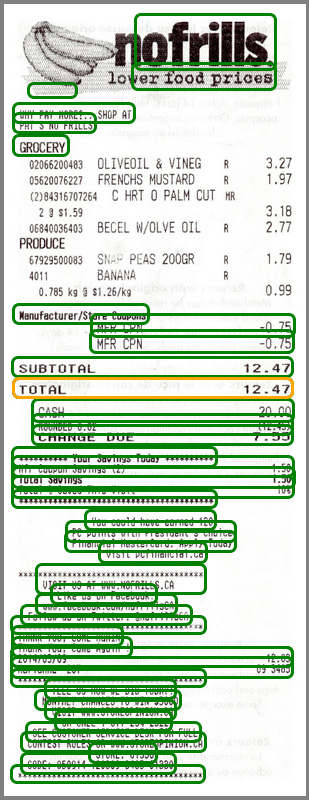
Here is a sample image illustrating the problem. The colored rectangles represent text Abbyy successfully processed. As you can see there is a large portion of the receipt missing OCR data.

As a test, I've modified the scan receipt in Photoshop to increase the line spacing in the problem area. After adding extra space between the lines Abbyy started generating OCR data for that area.
Obviously, I can't Photoshop every scan that has this problem and this problem is presenting itself in a significant percentage of our scans.
I have read over the documentation multiple times and can not find any settings that would indicate a solution to this problem.
Can anyone assist me?
Thanks,
コメント
1件のコメント
Dear sir, please send samples of images and description of this issue to dev_support@abbyyusa.com
サインインしてコメントを残してください。