how can we crop or resize image? ABBY fine reader will set image size by default to get better quality?
For example my input images can be different sizes. Can Abbyy resize the images so that the accuracy can be increased?
Admin Oksana Serdyuk

how can we crop or resize image? ABBY fine reader will set image size by default to get better quality?
For example my input images can be different sizes. Can Abbyy resize the images so that the accuracy can be increased?
Admin Oksana Serdyuk
0人中0人がこの記事が役に立ったと言っています
コメント
7件のコメント
Hi Rama
What have you tried so far? Can you please post your Java-code?
The "PagePreprocessingParams Object" can help you a lot, see the documentation
Best regards
Koen de Leijer
Hi Koen,
what is the difference between skew and orientation?
Hi Rama
Your "new" question is not actually about resizing but is more likely to be extended in your other question:
https://forum.ocrsdk.com/thread/skew-and-orientation/
Basically, the main difference is
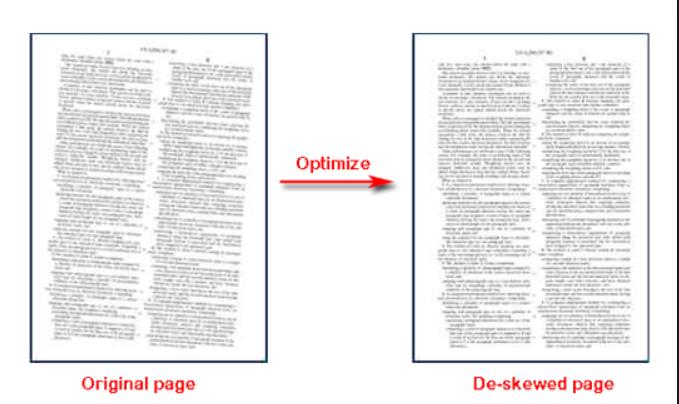
- skew: a page/document that has been scanned al little skew
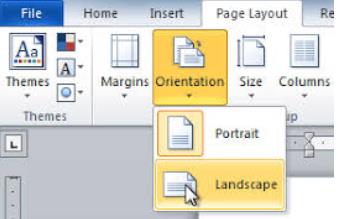
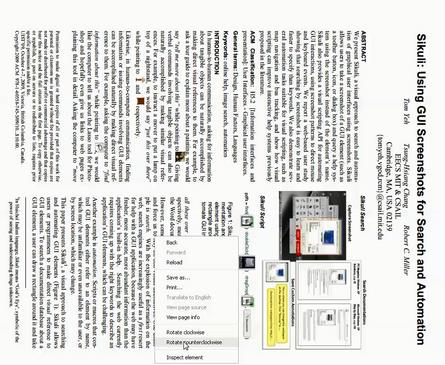
- orientation(-detection) : landscape vs portrait - or detection of it - and/or automatically rotate
See both image below:
Skew:
Orientation:
OrientationCorrection: (ABBYY FineReader can rotate this page to show it correctly)
Best regards
Koen de Leijer
// (c) 2018 ABBYY Production LLC // SAMPLES code is property of ABBYY, exclusive rights are reserved. // // DEVELOPER is allowed to incorporate SAMPLES into his own APPLICATION and modify it under // the terms of License Agreement between ABBYY and DEVELOPER. // ABBYY FineReader Engine 12 Sample // This sample shows basic steps of ABBYY FineReader Engine usage: // Initializing, opening image file, recognition and export. import com.abbyy.FREngine.*; import java.nio.file.*; public class Hello { public static void main( String[] args ) { try { Hello application = new Hello(); application.Run(); } catch( Exception ex ) { displayMessage( ex.getMessage() ); } } public void Run() throws Exception { // Load ABBYY FineReader Engine loadEngine(); try{ // Process with ABBYY FineReader Engine processWithEngine(); } finally { // Unload ABBYY FineReader Engine unloadEngine(); } } private void loadEngine() throws Exception { displayMessage( "Initializing Engine..." ); engine = Engine.InitializeEngine( SamplesConfig.GetDllFolder(), SamplesConfig.GetCustomerProjectId(), SamplesConfig.GetLicensePath(), SamplesConfig.GetLicensePassword(), "", "", false ); } private void processWithEngine() { try { // Setup FREngine setupFREngine(); // Process sample image processImage(); } catch( Exception ex ) { displayMessage( ex.getMessage() ); } } private void setupFREngine() { displayMessage( "Loading predefined profile..." ); engine.LoadPredefinedProfile( "DocumentConversion_Accuracy" ); // Possible profile names are: // "DocumentConversion_Accuracy", "DocumentConversion_Speed", // "DocumentArchiving_Accuracy", "DocumentArchiving_Speed", // "BookArchiving_Accuracy", "BookArchiving_Speed", // "TextExtraction_Accuracy", "TextExtraction_Speed", // "FieldLevelRecognition", // "BarcodeRecognition_Accuracy", "BarcodeRecognition_Speed", // "HighCompressedImageOnlyPdf", // "BusinessCardsProcessing", // "EngineeringDrawingsProcessing", // "Version9Compatibility", // "Default" } private void processImage() { // String imagePath = SamplesConfig.GetSamplesFolder() + "//home//DCXMprod//ABBYY//Samples//images//Charlotta_1.jpg"; String imagePath = SamplesConfig.GetSamplesFolder() + "images/skew/Doc_2.pdf"; try { // Don't recognize PDF file with a textual content, just copy it // Create document //engine.LoadPredefinedProfile("DocumentConversion_Accuracy"); //engine.CreateRecognizerParams().SetPredefinedTextLanguage("German"); //IEngine engine=null; //engine=Engine.GetEngineObject(SamplesConfig.GetDllFolder(),SamplesConfig.GetDeveloperSN()); //String profile=SamplesConfig.GetSamplesFolder() + "images/dff.ini"; //engine.LoadProfile(profile); IFRDocument document = engine.CreateFRDocument(); try { // Add image file to document displayMessage( "Loading image..." ); document.AddImageFile( imagePath, null, null ); //pages=document.getPages(); IDocumentProcessingParams docProcessingParams =engine.CreateDocumentProcessingParams(); IPageAnalysisParams tabParams=docProcessingParams.getPageProcessingParams().getPageAnalysisParams(); tabParams.setDetectText(true); // tabParams.setEnableTextExtractionMode(true); //tabParams.setAggressiveTableDetection(true); //tabParams.DetectTables=true; IXLExportParams xlparam=engine.CreateXLExportParams(); xlparam.setLayoutRetentionMode(XLSXLayoutRetentionModeEnum.XLLRM_ExactLines); xlparam.setTablesOnly(true); String texExportPath = SamplesConfig.GetSamplesFolder() + "images/skew/Doc_2ori.txt"; document.Export( texExportPath, FileExportFormatEnum.FEF_TextUnicodeDefaults, null); String xlExportPath = SamplesConfig.GetSamplesFolder() + "images/skew/Doc_2orie.xls"; document.Export( xlExportPath, FileExportFormatEnum.FEF_XLSX, xlparam); } finally { // Close document document.Close(); } } catch( Exception ex ) { displayMessage( ex.getMessage() ); } } private void unloadEngine() throws Exception { displayMessage( "Deinitializing Engine..." ); engine = null; Engine.DeinitializeEngine(); } private static void displayMessage( String message ) { System.out.println( message ); } private IEngine engine = null; }
Hi
check below code and input output.
private void processImage() {
// String imagePath = SamplesConfig.GetSamplesFolder() + "//home//DCXMprod//ABBYY//Samples//images//Charlotta_1.jpg";
String imagePath = SamplesConfig.GetSamplesFolder() + "images/skew/Doc_2.pdf";
try {
// Don't recognize PDF file with a textual content, just copy it
// Create document
IFRDocument document = engine.CreateFRDocument();
try {
// Add image file to document
displayMessage( "Loading image..." );
document.AddImageFile( imagePath, null, null );
//pages=document.getPages();
IDocumentProcessingParams docProcessingParams =engine.CreateDocumentProcessingParams();
IPageAnalysisParams tabParams=docProcessingParams.getPageProcessingParams().getPageAnalysisParams();
tabParams.setDetectText(true);
tabParams.setEnableTextExtractionMode(true);
//tabParams.setAggressiveTableDetection(true);
//tabParams.DetectTables=true;
//orientation
IPagePreprocessingParams pageproparams=engine.CreatePagePreprocessingParams();
pageproparams.setCorrectOrientation(true);
IXLExportParams xlparam=engine.CreateXLExportParams();
xlparam.setLayoutRetentionMode(XLSXLayoutRetentionModeEnum.XLLRM_ExactLines);
xlparam.setTablesOnly(true);
// Save results
document.Process(docProcessingParams);
//displayMessage( "Saving results..." );
// Save results to pdf using 'balanced' scenario
String texExportPath = SamplesConfig.GetSamplesFolder() + "images/skew/Doc_2ori.txt";
document.Export( texExportPath, FileExportFormatEnum.FEF_TextUnicodeDefaults, null);
String xlExportPath = SamplesConfig.GetSamplesFolder() + "images/skew/Doc_2orie.xls";
document.Export( xlExportPath, FileExportFormatEnum.FEF_XLSX, xlparam);
} finally {
// Close document
document.Close();
}
} catch( Exception ex ) {
displayMessage( ex.getMessage() );
}
}
Hi Rama

Can you please edit both posts and place the Java-code within the block-quote tag?
Thanks.
Also, Your excel-sheet is not readble.
Best regards
Koen de Leijer
PS. Here one of my examples:
I need to crop images with high quality because I want to upload images on my resume website. I want to gather some data from resume centers before this I need to read resume center reviews to write better resumes. I need to make resumes and upload images on my websites. Please help me to crop images with high quality.
サインインしてコメントを残してください。