Can you please post the original PDF and the part(s) of your Java-code with which you are trying to perfom the extraction? What characters are returned when using FineReader ?
Best regards Koen de Leijer
0
Permanently deleted user
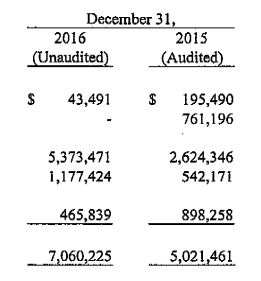
Hi please check below code. And i am not getting commas. instead of 43,491 i am getting 43491
By default, FineReader Engine exports numerical values to XLSX format as numbers rather than strings. That means numbers can have various appearance depending on Cells Format of the XLSX table.
In order to avoid this behavior and get the numbers exactly as they look in the source document, please set the ConvertStringsToNumbers property of the XLExportParams object to false. Please pay your attention that in this case, the numbers will appear as strings in the result XLSX file.

コメント
5件のコメント
Hi Rama
Can you please post the original PDF and the part(s) of your Java-code with which you are trying to perfom the extraction?
What characters are returned when using FineReader ?
Best regards
Koen de Leijer
Hi please check below code. And i am not getting commas. instead of 43,491 i am getting 43491
private void processImage() {
// String imagePath = SamplesConfig.GetSamplesFolder() + "//home//DCXMprod//ABBYY//Samples//images//Charlotta_1.jpg";
String imagePath = SamplesConfig.GetSamplesFolder() + "SampleImages/Capital/10060288989_1-redacted.pdf";
try {
// Don't recognize PDF file with a textual content, just copy it
// Create document
//engine.LoadPredefinedProfile("DocumentConversion_Accuracy");
//engine.CreateRecognizerParams().SetPredefinedTextLanguage("German");
//IEngine engine=null;
//engine=Engine.GetEngineObject(SamplesConfig.GetDllFolder(),SamplesConfig.GetDeveloperSN());
//String profile=SamplesConfig.GetSamplesFolder() + "images/dff.ini";
//engine.LoadProfile(profile);
IFRDocument document = engine.CreateFRDocument();
try {
// Add image file to document
displayMessage( "Loading image..." );
document.AddImageFile( imagePath, null, null );
//pages=document.getPages();
IDocumentProcessingParams docProcessingParams =engine.CreateDocumentProcessingParams();
IPageAnalysisParams tabParams=docProcessingParams.getPageProcessingParams().getPageAnalysisParams();
IPagePreprocessingParams pageproparams=engine.CreatePagePreprocessingParams();
pageproparams.setCorrectOrientation(true);
//tabParams.setDetectText(true);
//tabParams.setEnableTextExtractionMode(true);
//tabParams.setAggressiveTableDetection(true);
//tabParams.setDetectTables(true);
IRTFExportParams rtfparam=engine.CreateRTFExportParams();
rtfparam.setKeepLines(true);
//rtfparam.setPageSynthesisMode("PSM_RTFEditableCopy");
IXLExportParams xlparam=engine.CreateXLExportParams();
xlparam.setLayoutRetentionMode(XLSXLayoutRetentionModeEnum.XLLRM_ExactLines);
//xlparam.setTablesOnly(true);
document.Preprocess(pageproparams,null,null,null);
document.Process(docProcessingParams);
//displayMessage( "Saving results..." );
// Save results to rtf with default parameters
//String rtfExportPath = SamplesConfig.GetSamplesFolder() + "images/Elli_1.rtf";
//document.Export( rtfExportPath, FileExportFormatEnum.FEF_RTF, rtfparam);
// Save results to pdf using 'balanced' scenario
//IPDFExportParams pdfParams = engine.CreatePDFExportParams();
//pdfParams.setScenario( PDFExportScenarioEnum.PES_Balanced );
//String pdfExportPath = SamplesConfig.GetSamplesFolder() + "images/Elli_1tab1.pdf";
//document.Export( pdfExportPath, FileExportFormatEnum.FEF_PDF, pdfParams );
String xlExportPath = SamplesConfig.GetSamplesFolder() + "SampleImages/Capital/10060288989_1-redacted.xls";
//document.Export( texExportPath, FileExportFormatEnum.FEF_TextUnicodeDefaults, null);
document.Export(xlExportPath,FileExportFormatEnum.FEF_XLSX,xlparam);
//String xlExportPath = SamplesConfig.GetSamplesFolder() + "images/US/Equip3.xls";
//document.Export( xlExportPath, FileExportFormatEnum.FEF_XLSX, xlparam);
} finally {
// Close document
document.Close();
}
} catch( Exception ex ) {
displayMessage( ex.getMessage() );
}
}
Hi Rama
Can you please add the original PDF?
Best regards
Koen de Leijer
Hi!
By default, FineReader Engine exports numerical values to XLSX format as numbers rather than strings. That means numbers can have various appearance depending on Cells Format of the XLSX table.
In order to avoid this behavior and get the numbers exactly as they look in the source document, please set the ConvertStringsToNumbers property of the XLExportParams object to false. Please pay your attention that in this case, the numbers will appear as strings in the result XLSX file.
Have a good day!
サインインしてコメントを残してください。