
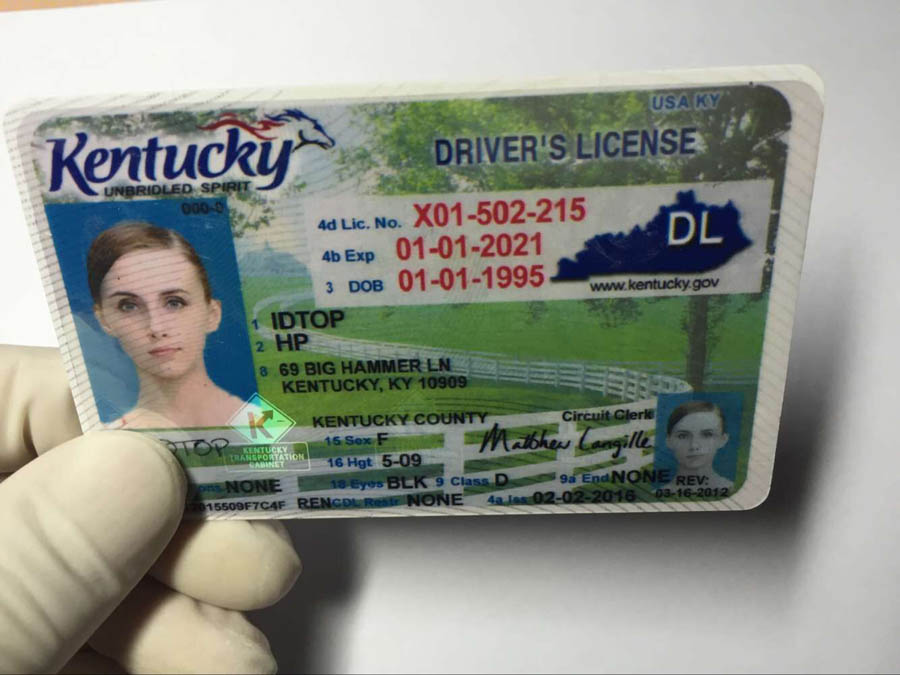
How can we process business cards . I am not getting any result for given card with below code.
private void processImage() {
// String imagePath = SamplesConfig.GetSamplesFolder() + "//home//DCXMprod//ABBYY//Samples//images//Charlotta_1.jpg";
String imagePath = SamplesConfig.GetSamplesFolder() + "SampleImages/dl/kentucky.jpg";
try {
// Don't recognize PDF file with a textual content, just copy it
if( engine.IsPdfWithTextualContent( imagePath, null ) ) {
displayMessage( "Copy results..." );
// String resultPath = SamplesConfig.GetSamplesFolder() + "/home/DCXMprod/ABBYY/Samples/images/Charlotta_1.txt";
String resultPath = SamplesConfig.GetSamplesFolder() + "SampleImages/dl/kentucky.jpg";
Files.copy( Paths.get( imagePath ), Paths.get( resultPath ), StandardCopyOption.REPLACE_EXISTING );
return;
}
// Create document
//engine.LoadPredefinedProfile("DocumentConversion_Accuracy");
//engine.CreateRecognizerParams().SetPredefinedTextLanguage("German");
//IEngine engine=null;
//engine=Engine.GetEngineObject(SamplesConfig.GetDllFolder(),SamplesConfig.GetDeveloperSN());
//String profile=SamplesConfig.GetSamplesFolder() + "images/dff.ini";
//engine.LoadProfile(profile);
IFRDocument document = engine.CreateFRDocument();
try {
// Add image file to document or preprocessing while opening
displayMessage( "Loading image..." );
IPrepareImageMode imageparam=engine.CreatePrepareImageMode();
imageparam.setEnhanceLocalContrast(true);
imageparam.setOverwriteResolution(true);
imageparam.setPhotoProcessingMode(PhotoProcessingModeEnum.PPM_TreatAsPhoto);
//IIntsCollection indices=engine.CreateIntsCollection();
//for (int i=0;i<pages_cnt;i++){
//indices.Add(pages_cnt-1);
//System.out.println(indices);
//}
document.AddImageFile( imagePath, imageparam, null );
//image modification params
IImageModification image_modif=engine.CreateImageModification();
image_modif.ClearPaintRegions();
image_modif.ClearRemoveGarbageRegions();
//page preprocesing params
IPagePreprocessingParams pageproparams=engine.CreatePagePreprocessingParams();
pageproparams.setCorrectOrientation(true);
//color object prohibit
//page analysis params
IDocumentProcessingParams docProcessingParams =engine.CreateDocumentProcessingParams();
IPageAnalysisParams tabparams=docProcessingParams.getPageProcessingParams().getPageAnalysisParams();
//tabParams.setDetectText(true);
//tabParams.setAggressiveTableDetection(true);
tabparams.setNoShadowsMode(true);
tabparams.setDetectMultipleBusinessCards(true);
//object extraction
IObjectsExtractionParams objparams=engine.CreateObjectsExtractionParams();
objparams.setDetectTextOnPictures(true);
objparams.setEnableAggressiveTextExtraction(true);
//Recognized params
IRecognizerParams recparams=engine.CreateRecognizerParams();
recparams.setLowResolutionMode(true);
recparams.setDetectTextTypesIndependently(true);
//synthesize params
ISynthesisParamsForPage sysparams=engine.CreateSynthesisParamsForPage();
sysparams.setSynthesizeBusinessCards(true);
//page splitting params
IPageSplittingParams pagesplitparams=engine.CreatePageSplittingParams();
pagesplitparams.setSplitType(PageSplitTypeEnum.PST_BusinessCardSplit);
//pages=document.getPages();
document.Preprocess(pageproparams,objparams,recparams,pagesplitparams);
document.Recognize(sysparams,objparams);
document.Process(docProcessingParams);
displayMessage( "Saving results..." );
// Save results to rtf with default parameters
//text output
String pdfExportPath = SamplesConfig.GetSamplesFolder() + "SampleImages/dl/kentucky.txt";
//document.Export( pdfExportPath, FileExportFormatEnum.FEF_PDF, pdfParams );
document.Export( pdfExportPath, FileExportFormatEnum.FEF_TextUnicodeDefaults, null);
//xml output
IXMLExportParams XMParams = engine.CreateXMLExportParams();
XMParams.setWriteCharAttributes(XMLCharAttributesEnum.XCA_Extended);
String xmlExportPath = SamplesConfig.GetSamplesFolder() + "SampleImages/dl/kentucky.xml";
//String pdfExportPath = outputFile;
document.Export( xmlExportPath, FileExportFormatEnum.FEF_XML, XMParams);
} finally {
// Close document
document.Close();
}
} catch( Exception ex ) {
displayMessage( ex.getMessage() );
}
}
コメント
5件のコメント
please check it and suggest proper ways
Hi Rama,
Please note that your image is not a business card but a driver's license, so it is not correct to apply business card processing methods to it.
For the faster responses and for more convenient communication, please send your future queries directly to ABBYY Technical Support via sdk_support@abbyy.com. Be sure to include the serial number to your message otherwise the support cannot be provided.
Hi Helen,
Thank you. Then what properties can be helpful for me in these cases?
Are you planning to use only drivers licenses? Do they all have the same layout?
I'd just use the regular OCR from Abbyy and read the positions from the XML. When a position falls within a certain range you could assume what field it is.
You could help the user a bit by showing brackets in the screen how to orient the card exactly.
Hi,
I wan to extract all the text from the card including height and sex details which are placed down part of card.
サインインしてコメントを残してください。