
Question
How can I export fields to different sheets of a single Excel file?
Answer
Export to different sheets of an Excel workbook can be configured using script export.
Below is a C# sample of such custom export to Excel. It exports data to different sheets depending on the value of one of the fields - FieldDocType.
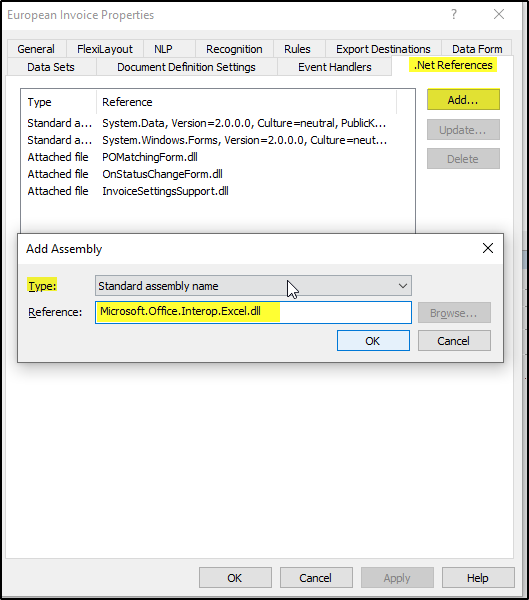
It is required to attach Microsoft.Office.Interop.Excel.dll as .NET reference in Document Definition properties > .NET References:
using Excel = Microsoft.Office.Interop.Excel;

//Start Excel and get Application object
Excel.Application excelApp = new Excel.Application();
excelApp.Visible = true;

//open Workbook from the specified path
string path = @"\\localhost\export\test.xlsx";
System.Reflection.Missing misVal = System.Reflection.Missing.Value;
Excel.Workbook excelWorkbook = excelApp.Workbooks.Open(path, misVal,misVal,misVal,misVal,misVal,
misVal,misVal,misVal,misVal,misVal,misVal,misVal,misVal,misVal);


// Sheets
string[] SheetName = {"Sheet1", "Sheet2", "Sheet3"};
Excel.Worksheet currentSheet = (Excel.Worksheet)excelWorkbook.Sheets[SheetName[0]];

// columns order
string[] columns = {"Document Section 1\\Field4",
                    "Document Section 1\\Field1",
                    "Document Section 1\\Field3",
                    "Document Section 1\\Field2"};

// Saving to different sheets depending on FieldDocType field value
if (Document.Field("Document Section 1\\FieldDocType").Text == "01")
    currentSheet = (Excel.Worksheet)excelWorkbook.Sheets[SheetName[0]];
else if (Document.Field("Document Section 1\\FieldDocType").Text == "02")
    currentSheet = (Excel.Worksheet)excelWorkbook.Sheets[SheetName[1]];
else         //if (Document.Field("Document Section 1\\FieldDocType").Text == "03")
    currentSheet = (Excel.Worksheet)excelWorkbook.Sheets[SheetName[2]];


// Figuring out the last used row of the sheet
Excel.Range last = currentSheet.Cells.SpecialCells(Excel.XlCellType.xlCellTypeLastCell, misVal);
int lastUsedRow = last.Row;

// Saving field values to current sheet after the last row
for (int cell_y=0; cell_y<columns.Length; cell_y++) {
    currentSheet.Cells[lastUsedRow+1, (cell_y+1)] = Document.Field(columns[cell_y]).Text;
}


// Save and close .xlsx
excelWorkbook.Save();
excelApp.Quit();